
Cuenta Contacto
Tu carrito
Envío con DPD y FedEx
¿Dudas? Pregunte a la IA

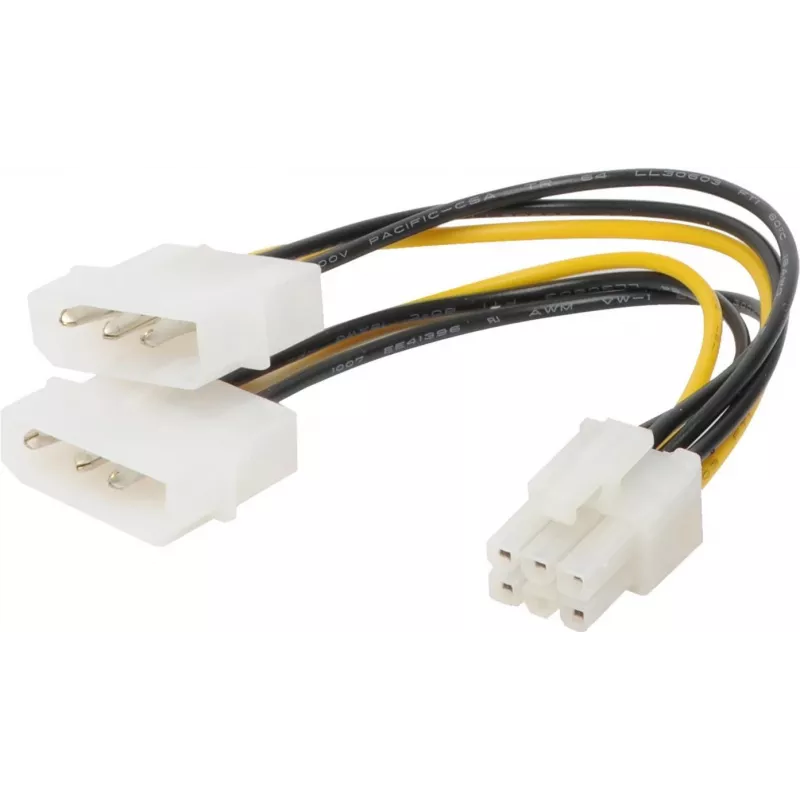
Cable de alimentación interno ShiverPeaks BS78226-HQ 0.13 m

Cable de alimentación interno ShiverPeaks BS78226-HQ 0.13 m
14,93 €
The ShiverPeaks internal power cable BS78226-HQ is a compact 0.13 m cable designed to distribute power from a PCI-E 6-pin source to two Molex 4-pin peripherals. Its short length is intended for close-proximity connections inside desktop PC cases where space is limited. The cable provides a straightf... Leer más
Stock AgotadoSin stock Código 2255484 Marca SHIVERPEAKS Modelo BS78226-HQ Garantía 2 años

Envíos y devoluciones

The ShiverPeaks internal power cable BS78226-HQ is a compact 0.13 m cable designed to distribute power from a PCI-E 6-pin source to two Molex 4-pin peripherals. Its short length is intended for close-proximity connections inside desktop PC cases where space is limited. The cable provides a straightforward solution for powering legacy drives, fans, or other Molex-powered components from a single PCI-E connector while maintaining tidy cable routing and reliable electrical contact.

Advantages

This internal power cable combines a PCI-E 6-pin input with two Molex 4-pin outputs in a compact 0.13 m form factor, reducing cable clutter and improving routing in small or tightly packed builds. The durable connector housings and secure pin contacts aim to ensure stable power delivery and reduce the risk of intermittent connections. Its short length minimizes slack inside the case, which can simplify airflow management and component placement.

Suitable for

  • Connecting legacy Molex-powered devices (optical drives, older HDDs) in small form-factor or standard desktop PCs
  • Powering case fans or accessories that require a 4-pin Molex connector
  • Routing power in builds where a short, direct connection from a PCI-E 6-pin source is preferred

Key specifications

  • Cable length: 0.13 m
  • Input connector: PCI-E 6-pin
  • Output connectors: 2 × Molex 4-pin
  • Use: internal power distribution for PC components
  • Cable type: short, fixed-length internal power lead

How to use

Power off and unplug the system before installing the cable. Locate an available PCI-E 6-pin power plug from the power supply and insert it firmly into the cable’s 6-pin input. Route the cable to the intended Molex devices, taking care to avoid sharp edges and moving components. Connect each Molex 4-pin plug to the corresponding device, ensuring correct orientation and a snug fit. After installation, verify all connections and power on the system to confirm proper operation.

Recommendations

Use this cable in systems where a short, direct connection is needed; avoid stretching the cable beyond its length and keep connectors free of dust and debris. For high-current or critical components, confirm that the source PCI-E connector and power supply can safely provide the required current for the connected devices.

Aspectos destacados
  • Connecting legacy Molex-powered devices (optical drives, older HDDs) in small form-factor or standard desktop PCs
  • Powering case fans or accessories that require a 4-pin Molex connector
  • Routing power in builds where a short, direct connection from a PCI-E 6-pin source is preferred
  • Cable length: 0.13 m
  • Input connector: PCI-E 6-pin
  • Output connectors: 2 × Molex 4-pin
  • Use: internal power distribution for PC components
  • Cable type: short, fixed-length internal power lead
Especificaciones
Color del producto
Black, Yellow
Conector 1
PCI-E (6-pin)
Conector 2
2 x Molex (4-pin)
Formato del conector 1
Straight
Formato del conector 2
Straight
Género del conector 1
Male
Género del conector 2
Male
Longitud del cable
0.13 m
Recubrimiento de los contactos del conector
Tin
El historial de precios aún no está disponible
Todavía estamos recopilando suficientes datos de precios diarios de este producto.

Productos populares en esta categoría

Hola, soy el asistente de IA de DistriNode. Puedo ayudarte a encontrar productos, comparar opciones, crear presupuestos en PDF o abrir solicitudes de soporte.