
Cuenta Contacto
Tu carrito
Envío con DPD y FedEx
¿Dudas? Pregunte a la IA

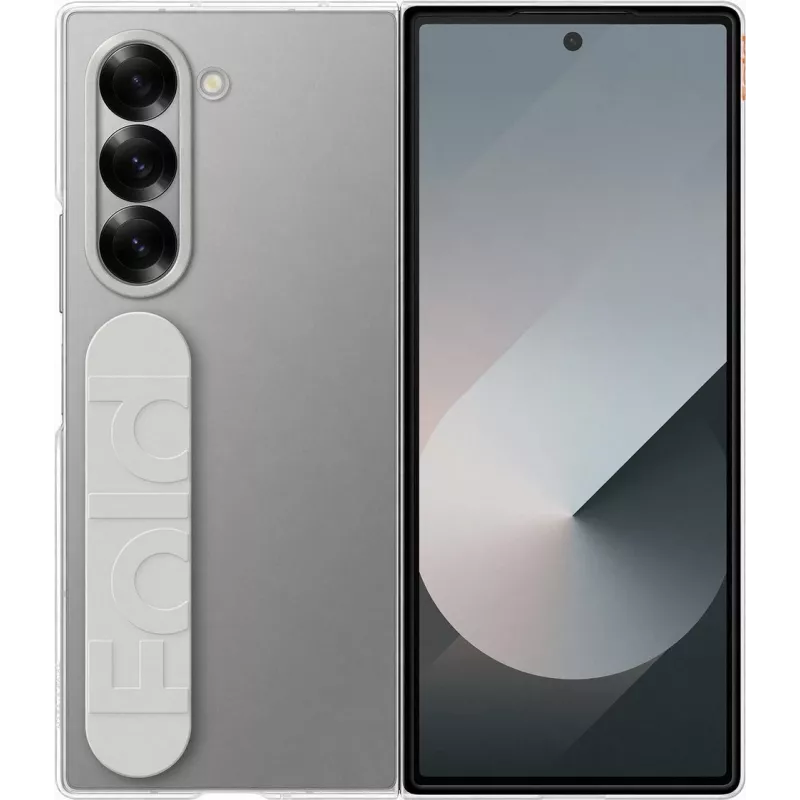
Funda protectora transparente Samsung EF-QF956CTEG para Galaxy Q6 — funda transparente para móvil

Funda protectora transparente Samsung EF-QF956CTEG para Galaxy Q6 — funda transparente para móvil
70,30 €
Transparent protective case Samsung EF-QF956CTEG designed specifically for Galaxy Q6 offers a slim, form-fitting cover that maintains the phone’s original appearance while providing basic protection. The lightweight clear material preserves visibility of the device’s design and color, ensures unobst... Leer más
Stock AgotadoSin stock Código 2215861 Marca SAMSUNG Modelo EF-QF956CTEG Garantía 2 años

Envíos y devoluciones

Transparent protective case Samsung EF-QF956CTEG designed specifically for Galaxy Q6 offers a slim, form-fitting cover that maintains the phone’s original appearance while providing basic protection. The lightweight clear material preserves visibility of the device’s design and color, ensures unobstructed access to ports, buttons and the camera, and helps protect against daily scratches and minor impacts.

Advantages

The slim profile keeps the phone thin and pocket-friendly without adding noticeable bulk. Transparent construction allows the Galaxy Q6 design to remain visible while providing coverage to the back and edges. Precise cutouts and tactile button covers ensure full functionality and easy use. The case is lightweight and easy to install or remove for cleaning or replacement.

Suitable for

  • Everyday mobile protection against scratches and light drops
  • Commuting and travel when minimal bulk is required
  • Users who want to preserve the original look of their Galaxy Q6
  • Situations requiring full access to ports, camera and buttons

Key specifications

  • Material: transparent protective thermoplastic / flexible polymer
  • Design: slim, form-fitting back and edge coverage
  • Compatibility: made for Galaxy Q6 dimensions and button layout
  • Weight: lightweight construction for minimal added mass
  • Functionality: precise cutouts for ports, camera and speaker; tactile button covers

How to use

Align the case with the Galaxy Q6, starting by placing the top or bottom edge into the case and gently pressing the sides until the device snaps securely into place. Verify that ports, camera and buttons are correctly aligned and fully accessible. To remove the case, carefully pry one corner away from the phone and work around the perimeter until the device is free. Clean the case with a soft, damp cloth and mild soap if needed, and allow it to dry completely before reinstallation.

Recommendations

For prolonged clarity, avoid exposing the case to prolonged direct sunlight and clean it periodically to remove dirt and oil. While the case provides scratch resistance and protection against minor impacts, use a screen protector for comprehensive screen protection and avoid high-impact drops.

Aspectos destacados
  • Everyday mobile protection against scratches and light drops
  • Commuting and travel when minimal bulk is required
  • Users who want to preserve the original look of their Galaxy Q6
  • Situations requiring full access to ports, camera and buttons
  • Material: transparent protective thermoplastic / flexible polymer
  • Design: slim, form-fitting back and edge coverage
  • Compatibility: made for Galaxy Q6 dimensions and button layout
  • Weight: lightweight construction for minimal added mass
  • Functionality: precise cutouts for ports, camera and speaker; tactile button covers
Especificaciones
Marca
Samsung
El historial de precios aún no está disponible
Todavía estamos recopilando suficientes datos de precios diarios de este producto.

Productos populares en esta categoría

Vendedor: UAB KUR LT · Laisvės pr. 125A, LT-06118 Vilna, Lituania · Código de empresa 303192950 · NIF-IVA UE LT100008198612 · Envío desde la UE (Lituania)
Hola, soy el asistente de IA de DistriNode. Puedo ayudarte a encontrar productos, comparar opciones, crear presupuestos en PDF o abrir solicitudes de soporte.