
Cuenta Contacto
Tu carrito
Envío con DPD y FedEx
¿Dudas? Pregunte a la IA

Juego de piezas de repuesto DoorBird 423860209 multicolor

Juego de piezas de repuesto DoorBird 423860209 multicolor
72,04 €
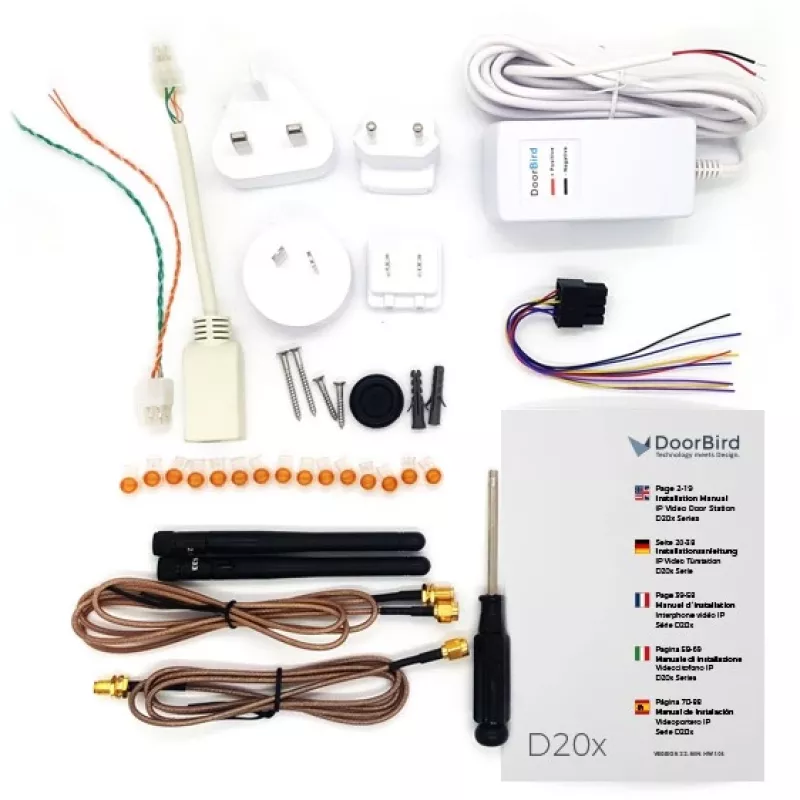
The DoorBird 423860209 spare parts kit Multicolour provides a set of replacement components intended for maintenance and repair of DoorBird intercom systems. The kit gathers commonly needed items — power supply, screws, antennas, antenna cables and other small parts — in a single package to restore ... Leer más
Stock AgotadoSin stock Código 1213026 Marca DOORBIRD Modelo 423860209 Garantía 2 años

Envíos y devoluciones

The DoorBird 423860209 spare parts kit Multicolour provides a set of replacement components intended for maintenance and repair of DoorBird intercom systems. The kit gathers commonly needed items — power supply, screws, antennas, antenna cables and other small parts — in a single package to restore functionality or replace worn components. The multicolour elements are intended to match or complement different installations and make replacements straightforward.

Advantages

This spare parts kit consolidates essential components for quick on-site servicing of DoorBird intercoms, reducing the need to source individual parts. Including a compatible power supply and antenna hardware helps ensure reliable operation after repair. The compact assortment of screws, cables and small parts simplifies installation and reduces downtime during maintenance.

Suitable for

  • Maintenance and repair of DoorBird intercom units
  • On-site servicing by installers or technicians
  • Replacing failed power supply or antenna components
  • Upgrading or adapting an existing intercom installation

Key specifications

  • Includes power supply compatible with DoorBird intercom requirements
  • Assortment of mounting screws and fasteners for installation
  • External antenna(s) and antenna cable(s) for wireless connectivity
  • Various small parts and connectors required for typical repairs
  • Multicolour components for flexible visual integration

How to use

Identify the failed or worn component in the DoorBird intercom and select the corresponding replacement from the kit. Power down the unit and follow the manufacturer’s service instructions or installation guide when removing old parts and installing new ones. Use the provided screws and fasteners to secure components, connect antenna cables to the designated ports, and attach the power supply according to the intercom’s input requirements. After reassembly, power the unit and verify operation, including network connectivity and audio/video functions where applicable.

Recommendations

Use the kit for routine maintenance or emergency repairs; if you are unsure about electrical connections or network setup, consult a qualified installer or the DoorBird technical documentation to ensure correct installation and safe operation.

Aspectos destacados
  • Maintenance and repair of DoorBird intercom units
  • On-site servicing by installers or technicians
  • Replacing failed power supply or antenna components
  • Upgrading or adapting an existing intercom installation
  • Includes power supply compatible with DoorBird intercom requirements
  • Assortment of mounting screws and fasteners for installation
  • External antenna(s) and antenna cable(s) for wireless connectivity
  • Various small parts and connectors required for typical repairs
  • Multicolour components for flexible visual integration
Especificaciones
Color del producto
Multicolour
Compatibilidad
D20x IP Video Door Stations
Compatibilidad con marcas
DoorBird
País de origen
Germany
Tipo de producto
Spare parts kit
Historial de precios de los últimos 6 meses
Juego de piezas de repuesto DoorBird 423860209 multicolor
Actual
72,04 €
Mínimo
71,05 €
Máximo
74,87 €
Variación 24 h
-0,05 €   0%
Semana
+0,74 €   +1%
Mes
+0,56 €   +1%

Productos populares en esta categoría

Hola, soy el asistente de IA de DistriNode. Puedo ayudarte a encontrar productos, comparar opciones, crear presupuestos en PDF o abrir solicitudes de soporte.