
Cuenta Contacto
Tu carrito
Envío con DPD y FedEx
¿Dudas? Pregunte a la IA

Microconnect MC-USB2.0HUB4P Hub de interfaz USB 2.0 400 Mbit/s negro

Microconnect MC-USB2.0HUB4P Hub de interfaz USB 2.0 400 Mbit/s negro
33,61 €
The MicroConnect MC-USB2.0HUB4P is a compact USB 2.0 hub that adds four USB 2.0 ports to a computer or laptop. It supports data transfer rates up to 400 Mbit/s and comes in a slim black housing that is lightweight and portable, making it suitable for use at home, in the office, or on the go.Advantag... Leer más
Stock AgotadoSin stock Código 1183255 Marca MICROCONNECT Modelo MC-USB2.0HUB4P Garantía 3 años
CategoríaHubs USB

Envíos y devoluciones

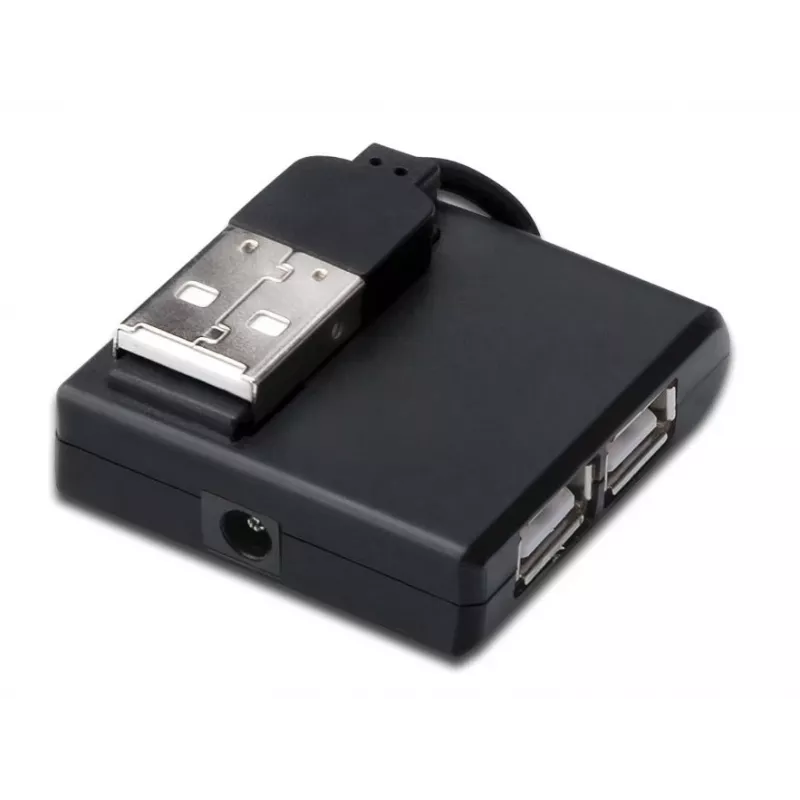
The MicroConnect MC-USB2.0HUB4P is a compact USB 2.0 hub that adds four USB 2.0 ports to a computer or laptop. It supports data transfer rates up to 400 Mbit/s and comes in a slim black housing that is lightweight and portable, making it suitable for use at home, in the office, or on the go.

Advantages

The hub provides four additional USB 2.0 interfaces in a single compact unit, enabling connection of multiple peripherals at once. With a low weight of 20 g and small package dimensions, it is easy to carry and store. The black design fits most workspaces and devices, and the USB 2.0 host and hub interfaces ensure broad compatibility with a wide range of USB devices.

Suitable for

  • Connecting mice, keyboards and printers
  • Attaching external storage devices and flash drives
  • Charging small USB devices (via USB 2.0 ports)
  • Expanding USB connectivity for laptops and desktops with limited ports

Key specifications

  • Brand: MicroConnect
  • Model: MC-USB2.0HUB4P
  • Ports quantity: 4
  • Host interface: USB 2.0
  • Hub interfaces: USB 2.0
  • Data transfer rate: up to 400 Mbit/s
  • Product colour: Black
  • Weight: 0.02 kg

How to use

Connect the MicroConnect MC-USB2.0HUB4P to an available USB 2.0 port on your computer or laptop. Once connected, plug your USB devices into the hub’s four ports. The hub is plug-and-play with most operating systems and typically requires no additional drivers. For devices that require more power than USB 2.0 can provide, consider connecting externally powered peripherals or using a powered hub.

Recommendations

Use the hub for data transfer and connecting low-power peripherals. Avoid relying on this passive USB 2.0 hub for charging high-current devices; for such needs, choose a powered hub or connect directly to a powered USB port.
Aspectos destacados
  • Connecting mice, keyboards and printers
  • Attaching external storage devices and flash drives
  • Charging small USB devices (via USB 2.0 ports)
  • Expanding USB connectivity for laptops and desktops with limited ports
  • Brand: MicroConnect
  • Model: MC-USB2.0HUB4P
  • Ports quantity: 4
  • Host interface: USB 2.0
  • Hub interfaces: USB 2.0
  • Data transfer rate: up to 400 Mbit/s
  • Product colour: Black
  • Weight: 0.02 kg
Especificaciones
Altura del embalaje
19 mm
Ancho del embalaje
157 mm
Código del Sistema Armonizado (HS)
84719000
Color del producto
Black
Conector de entrada de CC
Yes
Interfaces del concentrador
USB 2.0
Interfaz de host
USB 2.0
Número de puertos
4
Peso
20 g
Peso del embalaje
24 g
Profundidad del embalaje
120 mm
Velocidad de transferencia de datos
400 Mbit/s

Folleto

Abrir documento
El historial de precios aún no está disponible
Todavía estamos recopilando suficientes datos de precios diarios de este producto.

Escribir una opinión

Valoración *
Tu nombre se mostrará públicamente: puedes usar un apodo. Invitamos a los compradores a escribir opiniones; las revisamos antes de publicarlas y publicamos también las críticas.

Más productos MICROCONNECT en esta categoría

Productos populares en esta categoría

Vendedor: UAB KUR LT · Laisvės pr. 125A, LT-06118 Vilna, Lituania · Código de empresa 303192950 · NIF-IVA UE LT100008198612 · Envío desde la UE (Lituania)
Hola, soy el asistente de IA de DistriNode. Puedo ayudarte a encontrar productos, comparar opciones, crear presupuestos en PDF o abrir solicitudes de soporte.
Todas las categorías