
Cuenta Contacto
Tu carrito
Envío con DPD y FedEx
¿Dudas? Pregunte a la IA

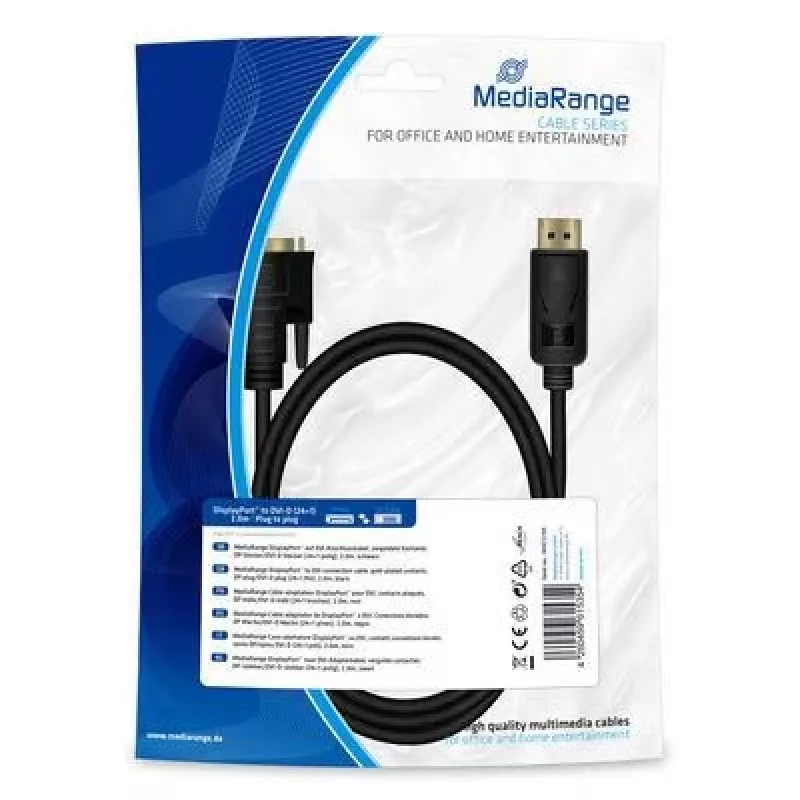
Adaptador de cable de vídeo MediaRange MRCS199 2m DisplayPort DVI negro

Adaptador de cable de vídeo MediaRange MRCS199 2m DisplayPort DVI negro
23,31 €
The MediaRange MRCS199 is a 2 m video cable adapter that connects a DisplayPort source to a DVI display. Its black, durable design provides stable video transmission for connecting computers, laptops or other DisplayPort-enabled devices to DVI monitors or projectors. The cable is suitable for everyd... Leer más
Stock 11 Código 1202905 Marca MEDIARANGE Modelo MRCS199 Garantía 2 años

Envíos y devoluciones

Entrega estimada Martes, Octubre 27
Te mantendremos informado a través de nuestro sistema de seguimiento detallado
Opciones de pago
Tarjeta bancariaVisaMastercardPayPalApple PayGoogle PayTransferencia bancaria

The MediaRange MRCS199 is a 2 m video cable adapter that connects a DisplayPort source to a DVI display. Its black, durable design provides stable video transmission for connecting computers, laptops or other DisplayPort-enabled devices to DVI monitors or projectors. The cable is suitable for everyday office and home use where a reliable DisplayPort-to-DVI connection is required.

Advantages

The MRCS199 offers a simple, single-cable solution to convert DisplayPort output to a DVI input without additional drivers. Its 2 m length provides flexible placement between devices while the robust black jacket improves longevity and resistance to wear. The adapter supports clear digital video transfer where DVI is available, ensuring compatibility with many existing displays.

Suitable for

  • Connecting a desktop or laptop with DisplayPort to a DVI monitor
  • Linking computers to projectors with DVI input for presentations
  • Replacing or extending an existing DisplayPort-to-DVI connection in offices or home workstations

Key specifications

  • Brand: MediaRange
  • Model: MRCS199
  • Cable length: 2 m
  • Connector 1: DisplayPort
  • Connector 2: DVI
  • Colour: Black
  • Category: Monitor / Display cables
  • MPN: MRCS199
  • EAN: 4260459615354

How to use

Plug the DisplayPort end into the DisplayPort output on your computer or source device and connect the DVI end to the DVI input on the monitor or projector. Ensure both devices are powered on and set the display input to the correct DVI source. Adjust display settings on the source device as needed for resolution and screen arrangement.

Recommendations

For best results, use the MRCS199 for video-only connections where no audio transfer is required, and avoid sharp bends or heavy strain on the cable to maintain signal integrity and prolong the cable life.
Aspectos destacados
  • Connecting a desktop or laptop with DisplayPort to a DVI monitor
  • Linking computers to projectors with DVI input for presentations
  • Replacing or extending an existing DisplayPort-to-DVI connection in offices or home workstations
  • Brand: MediaRange
  • Model: MRCS199
  • Cable length: 2 m
  • Connector 1: DisplayPort
  • Connector 2: DVI
  • Colour: Black
  • Category: Monitor / Display cables
  • MPN: MRCS199
  • EAN: 4260459615354
Especificaciones
Calibre AWG del cable
30
Cantidad por paquete
1 pc(s)
Color del producto
Black
Conector 1
DisplayPort
Conector 2
DVI
DVI Dual Link
Yes
Formato del conector 1
Straight
Formato del conector 2
Straight
Género del conector 1
Male
Género del conector 2
Male
Longitud del cable
2 m
Modos de vídeo compatibles
1080p
Plug and Play
Yes
Recubrimiento de los contactos del conector
Gold
Resoluciones gráficas compatibles
1920 x 1080 (HD 1080)
Tipo de embalaje
Polybag
Historial de precios de los últimos 6 meses
Adaptador de cable de vídeo MediaRange MRCS199 2m DisplayPort DVI negro
Actual
23,31 €
Mínimo
20,38 €
Máximo
39,02 €
Variación 24 h
+0,51 €   +2%
Semana
+0,46 €   +2%
Mes
+2,87 €   +14%

Productos populares en esta categoría

Hola, soy el asistente de IA de DistriNode. Puedo ayudarte a encontrar productos, comparar opciones, crear presupuestos en PDF o abrir solicitudes de soporte.