
Cuenta Contacto
Tu carrito
Envío con DPD y FedEx
¿Dudas? Pregunte a la IA

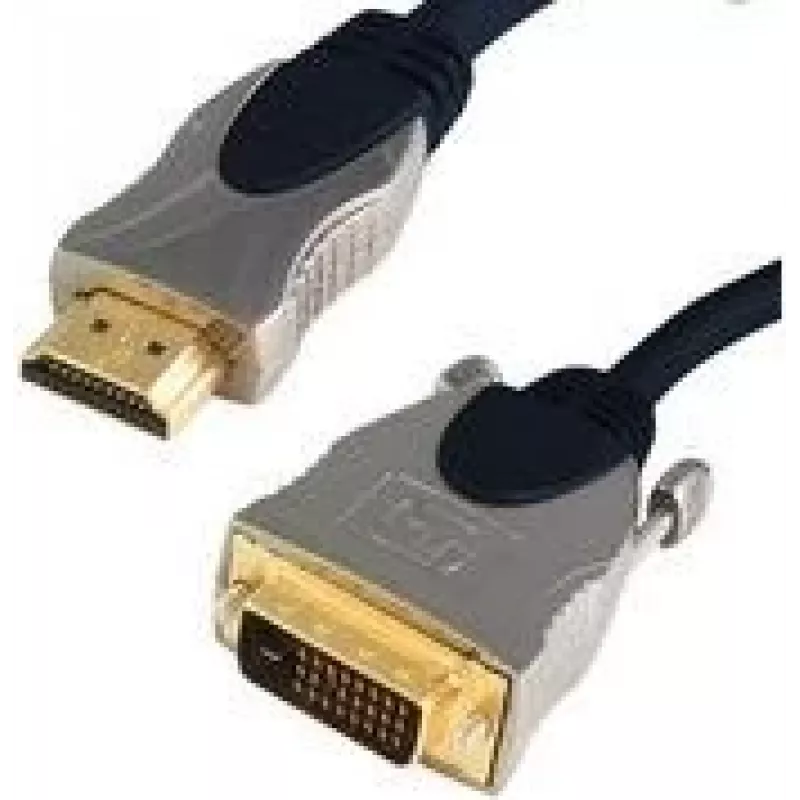
Adaptador de cable de vídeo ShiverPeaks 77482-SPP 2 m HDMI DVI-D azul

Adaptador de cable de vídeo ShiverPeaks 77482-SPP 2 m HDMI DVI-D azul
20,83 €
The ShiverPeaks 77482-SPP 2m HDMI DVI-D Blue is a 2-meter video cable adapter designed to connect HDMI source devices to DVI-D displays. The adapter supports digital video transmission between HDMI-equipped devices (such as laptops, media players and graphics cards) and DVI-D monitors, projectors or... Leer más
Stock 5 Código 2229471 Marca SHIVERPEAKS Modelo 77482-SPP Garantía 2 años

Envíos y devoluciones

Entrega estimada Martes, Octubre 27
Te mantendremos informado a través de nuestro sistema de seguimiento detallado
Opciones de pago
Tarjeta bancariaVisaMastercardPayPalApple PayGoogle PayTransferencia bancaria

The ShiverPeaks 77482-SPP 2m HDMI DVI-D Blue is a 2-meter video cable adapter designed to connect HDMI source devices to DVI-D displays. The adapter supports digital video transmission between HDMI-equipped devices (such as laptops, media players and graphics cards) and DVI-D monitors, projectors or TVs that accept a DVI-D input. Its blue finish and molded connectors provide a durable, easily identifiable cable for desktop and AV setups.

Advantages

This 2 m HDMI to DVI-D cable adapter offers a straightforward digital-only connection that preserves video signal quality when linking compatible devices. The molded connectors and flexible jacket are intended to withstand repeated plugging and routing behind equipment. The cable’s length provides a balance between reach and tidy cable management for typical desk and AV installation scenarios.

Suitable for

  • Connecting an HDMI output from a PC or media player to a DVI-D monitor
  • Linking laptops or graphics cards to projectors with DVI-D inputs
  • Replacing or extending an existing short HDMI-to-DVI-D connection

Key specifications

  • Cable length: 2 m
  • Connector 1: HDMI (digital video)
  • Connector 2: DVI-D (digital video)
  • Product colour: Blue

How to use

Connect the HDMI end of the cable to the HDMI output on the source device and plug the DVI-D end into the DVI-D input on the display. Ensure both devices are powered off or in a safe state during connection to avoid hot-plug issues, then power on the devices and select the appropriate input on the display. Adjust display resolution and refresh rate in the source device settings if required to match the capabilities of the DVI-D display. Note that this cable provides digital video only; audio will not be carried over DVI-D and requires a separate audio connection if sound is needed.

Recommendations

For reliable operation, route the cable without sharp bends and avoid placing heavy objects on it. Use the 2 m length for typical desktop and AV setups; for longer runs, choose an appropriately rated cable. Check display and source compatibility for supported resolutions to ensure the best video experience.

Aspectos destacados
  • Connecting an HDMI output from a PC or media player to a DVI-D monitor
  • Linking laptops or graphics cards to projectors with DVI-D inputs
  • Replacing or extending an existing short HDMI-to-DVI-D connection
  • Cable length: 2 m
  • Connector 1: HDMI (digital video)
  • Connector 2: DVI-D (digital video)
  • Product colour: Blue
Especificaciones
Apantallamiento del cable
Aluminium mylar foil
Color del producto
Blue
Conector 1
HDMI
Conector 2
DVI-D
Género del conector 1
Male
Género del conector 2
Male
Longitud del cable
2 m
Material del cable
Copper
Recubrimiento de los contactos del conector
Gold
Historial de precios de los últimos 6 meses
Adaptador de cable de vídeo ShiverPeaks 77482-SPP 2 m HDMI DVI-D azul
Actual
20,83 €
Mínimo
20,29 €
Máximo
24,78 €
Variación 24 h
+0,44 €   +2%
Semana
+0,26 €   +1%
Mes
-3,83 €   -16%

Productos populares en esta categoría

Hola, soy el asistente de IA de DistriNode. Puedo ayudarte a encontrar productos, comparar opciones, crear presupuestos en PDF o abrir solicitudes de soporte.