
Cuenta Contacto
Tu carrito
Envío con DPD y FedEx
¿Dudas? Pregunte a la IA

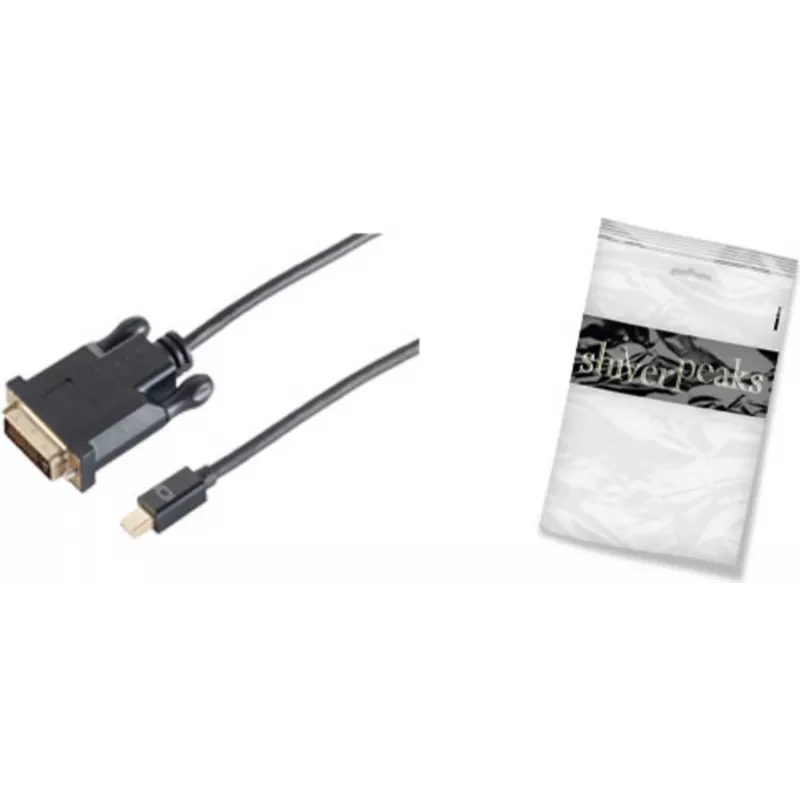
Adaptador de cable de vídeo ShiverPeaks BS10-55055

Adaptador de cable de vídeo ShiverPeaks BS10-55055
26,45 €
The ShiverPeaks BS10-55055 is a 5 m video cable adapter that converts Mini DisplayPort output to a DVI-D input. Designed for transmitting digital video signals from laptops, mini PCs or graphics cards with Mini DisplayPort to monitors and projectors with DVI-D, the cable provides a simple, single-ca... Leer más
Stock 113 Código 2231079 Marca SHIVERPEAKS Modelo BS10-55055 Garantía 2 años

Envíos y devoluciones

Entrega estimada Viernes, Octubre 23
Te mantendremos informado a través de nuestro sistema de seguimiento detallado
Opciones de pago
Tarjeta bancariaVisaMastercardPayPalApple PayGoogle PayTransferencia bancaria

The ShiverPeaks BS10-55055 is a 5 m video cable adapter that converts Mini DisplayPort output to a DVI-D input. Designed for transmitting digital video signals from laptops, mini PCs or graphics cards with Mini DisplayPort to monitors and projectors with DVI-D, the cable provides a simple, single-cable connection in a black finish and is supplied in a polybag for compact storage and transport.

Advantages

This Mini DisplayPort to DVI-D cable offers a stable digital video connection over a 5 m length, reducing the need for additional converters or docking stations. Its fixed cable design eliminates connector adapters that can be lost or disconnected, and the black outer jacket provides discreet integration with typical office and home setups. Supplied in a polybag, the adapter is lightweight and easy to carry between workstations.

Suitable for

  • Connecting laptops or desktops with Mini DisplayPort to DVI-D monitors
  • Setting up presentations with projectors that accept DVI-D
  • Home office multi-monitor configurations using DVI-D inputs
  • Temporary workstation setups and IT troubleshooting

Key specifications

  • Cable length: 5 m
  • Connector 1: Mini DisplayPort
  • Connector 2: DVI-D (digital only)
  • Colour: Black
  • Packaging: Polybag

How to use

Connect the Mini DisplayPort end of the adapter to the Mini DisplayPort output on your source device and insert the DVI-D connector into the display or projector's DVI-D input. Ensure both devices are powered off or set to the correct input before connecting to prevent signal issues. After connection, power on the display and source device and select the DVI input on the monitor if needed. Adjust display settings on the source device to match the monitor's native resolution for optimal image quality.

Recommendations

For best results, use the cable for digital video signals only and avoid forcing connectors. If longer distances or additional functionality (audio pass-through or active conversion) are required, consider compatible active adapters or signal extenders. Store the cable in its polybag when not in use to protect the connectors and jacket.

Aspectos destacados
  • Connecting laptops or desktops with Mini DisplayPort to DVI-D monitors
  • Setting up presentations with projectors that accept DVI-D
  • Home office multi-monitor configurations using DVI-D inputs
  • Temporary workstation setups and IT troubleshooting
  • Cable length: 5 m
  • Connector 1: Mini DisplayPort
  • Connector 2: DVI-D (digital only)
  • Colour: Black
  • Packaging: Polybag
Especificaciones
Cantidad por paquete
1 pc(s)
Color del producto
Black
Conector 1
Mini DisplayPort
Conector 2
DVI-D
Género del conector 1
Male
Género del conector 2
Female
Longitud del cable
5 m
Plug and Play
Yes
Recubrimiento de los contactos del conector
Gold
Resolución máxima
2560 x 1600
Tipo de embalaje
Polybag
Versión de DisplayPort
1.2
Historial de precios de los últimos 6 meses
Adaptador de cable de vídeo ShiverPeaks BS10-55055
Actual
26,45 €
Mínimo
25,90 €
Máximo
26,45 €
Variación 24 h
+0,48 €   +2%
Semana
+0,54 €   +2%
Mes
—   

Productos populares en esta categoría

Hola, soy el asistente de IA de DistriNode. Puedo ayudarte a encontrar productos, comparar opciones, crear presupuestos en PDF o abrir solicitudes de soporte.