
Cuenta Contacto
Tu carrito
Envío con DPD y FedEx
¿Dudas? Pregunte a la IA

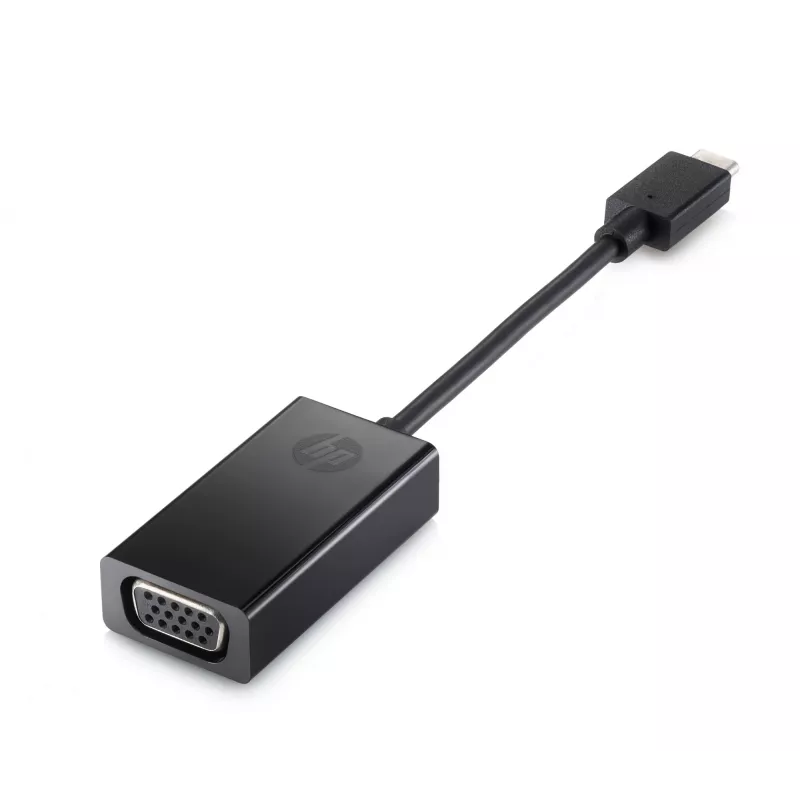
Adaptador de pantalla USB-C a VGA HP P7Z54AA

Adaptador de pantalla USB-C a VGA HP P7Z54AA
11,39 €
The USB-C to VGA Display Adapter HP P7Z54AA lets you connect a notebook, tablet or other USB-C equipped device to an external VGA monitor, TV or projector. Compact and lightweight, this adapter provides a simple wired video output solution for presentations, meetings or extending your workspace.Adva... Leer más
Stock 1 Código 25439 Marca HP Modelo P7Z54AA#ABB Garantía 2 años

Envíos y devoluciones

Entrega estimada Martes, Octubre 20
Te mantendremos informado a través de nuestro sistema de seguimiento detallado
Opciones de pago
Tarjeta bancariaVisaMastercardPayPalApple PayGoogle PayTransferencia bancaria

The USB-C to VGA Display Adapter HP P7Z54AA lets you connect a notebook, tablet or other USB-C equipped device to an external VGA monitor, TV or projector. Compact and lightweight, this adapter provides a simple wired video output solution for presentations, meetings or extending your workspace.

Advantages

One-cable connectivity enables video output from the device’s USB-C port to a VGA display without additional power. The adapter is small (0.076 m cable length) and lightweight (about 20 g), making it easy to carry with a laptop or tablet. HP provides a one-year limited warranty for manufacturer support.

Suitable for

  • Presentations on projectors in meeting rooms
  • Connecting laptops or tablets to VGA monitors or TVs
  • Temporary multi-display setups or workspace extension

Key specifications

  • Model: HP P7Z54AA
  • Connector A: USB Type-C
  • Connector B: VGA (D-Sub)
  • Cable length: 0.076 m
  • Weight: 0.02 kg
  • Colour: Black
  • Warranty: One-year limited

How to use

Connect the USB-C connector to a compatible device’s USB-C port that supports video output (DisplayPort over USB-C). Plug a VGA cable from the adapter’s VGA port to the external monitor, TV or projector. Select the appropriate input on the external display and configure the display settings (mirror or extend) from your device’s display options.

Recommendations

Ensure your source device supports video output over USB-C before use. Use a standard VGA cable and avoid excessive bending of the adapter cable. For optimal image quality, use the native resolution supported by the external display.

One-cable connectivity

Plug the adapter into your tablet or notebook’s USB-C™ port and send your work to a monitor, projector or TV through the VGA port.[1]

Take it to go

Store the small adapter with you in your device’s carrying case for quick projection wherever you work.
Aspectos destacados
  • Presentations on projectors in meeting rooms
  • Connecting laptops or tablets to VGA monitors or TVs
  • Temporary multi-display setups or workspace extension
  • Model: HP P7Z54AA
  • Connector A: USB Type-C
  • Connector B: VGA (D-Sub)
  • Cable length: 0.076 m
  • Weight: 0.02 kg
  • Colour: Black
  • Warranty: One-year limited
Especificaciones
Altura
13 mm
Altura del embalaje
35 mm
Ancho
151 mm
Ancho del embalaje
245 mm
Código del Sistema Armonizado (HS)
84733020
Código UNSPSC
26121630
Color del producto
Black
Conector 1
VGA (D-Sub)
Conector 2
USB Type-C
Contenido de la caja
Adapter
Formato del conector 1
Straight
Formato del conector 2
Straight
Género del conector 1
Female
Género del conector 2
Male
Longitud del cable
0.076 m
Otros sistemas operativos compatibles
ChromeOS
País de origen
China
Peso
20 g
Peso del embalaje
100 g
Profundidad
25.5 mm
Profundidad del embalaje
110 mm
Segmento HP
Home
Sistemas operativos Windows compatibles
Windows 10, Windows 11

Folleto

Abrir documento
Historial de precios de los últimos 6 meses
Adaptador de pantalla USB-C a VGA HP P7Z54AA
Actual
11,39 €
Mínimo
10,62 €
Máximo
59,31 €
Variación 24 h
+0,72 €   +7%
Semana
+0,69 €   +6%
Mes
+0,74 €   +7%

Productos populares en esta categoría

Hola, soy el asistente de IA de DistriNode. Puedo ayudarte a encontrar productos, comparar opciones, crear presupuestos en PDF o abrir solicitudes de soporte.