
Cuenta Contacto
Tu carrito
Envío con DPD y FedEx
¿Dudas? Pregunte a la IA

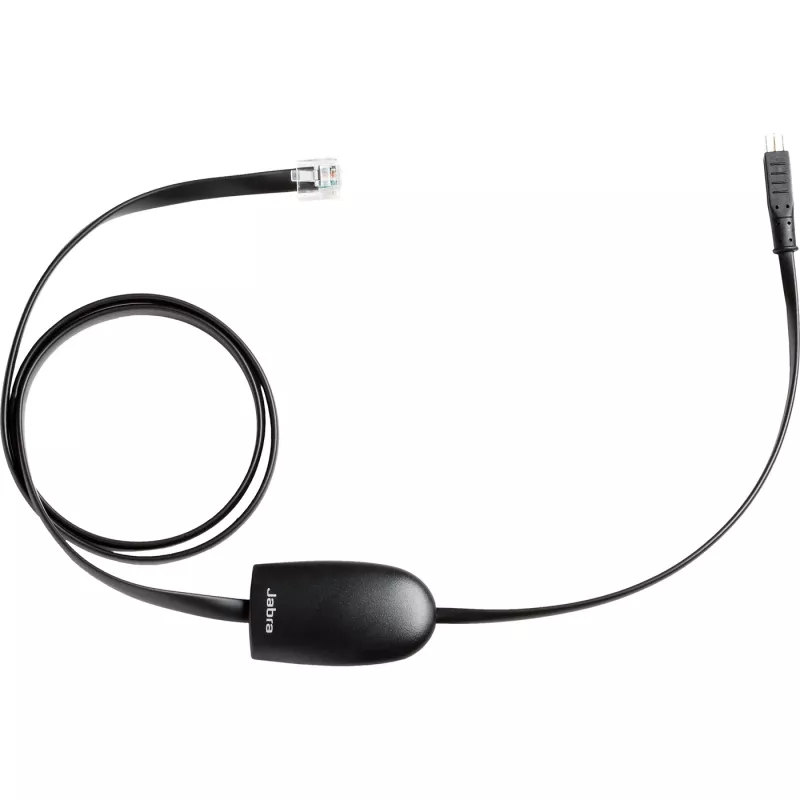
Adaptador EHS Jabra Polycom 14201-17

Adaptador EHS Jabra Polycom 14201-17
56,48 €
Enjoy wireless freedom and get remote call control on your wireless headset from a wide range of Polycom SoundPoint IP phones using an Electronic Hook Switch (EHS) cord. Answer or end calls, mute the microphone and adjust volume when you are away from the desk.Adapter enabling Electronic Hookswitch ... Leer más
Stock 50 Código 117924 Marca JABRA Modelo 14201-17 Garantía 2 años

Envíos y devoluciones

Entrega estimada Viernes, Octubre 16
Te mantendremos informado a través de nuestro sistema de seguimiento detallado
Opciones de pago
Tarjeta bancariaVisaMastercardPayPalApple PayGoogle PayTransferencia bancaria
Enjoy wireless freedom and get remote call control on your wireless headset from a wide range of Polycom SoundPoint IP phones using an Electronic Hook Switch (EHS) cord. Answer or end calls, mute the microphone and adjust volume when you are away from the desk.

Adapter enabling Electronic Hookswitch Control (EHS) for Polycom® SoundPoint® IP phones. Plug-and-play solution

Electronic hook switch solution for Polycom SoundPoint IP phones - plug-and-play. Jabra LINK 14201-17 enables remote Electronic Hook Switch Control (EHS) with Jabra wireless headset and select Polycom Soundpoint IP phones .Once installed, employees can control their call directly from their up to 450 ft away from their desk.

150 Metres Wireless Freedom

The Jabra Link™ 14201 series puts the freedom and convenience of wireless communication in everyone’s reach. You can now walk and talk up to 150 metres away from your deskphone. Answer calls, multitask and move around on your terms.

Easy to deploy

The Jabra Link™ 14201 series is optimised for use with all leading deskphone systems that provide EHS functionality and enables plug-and-play remote call control functionality with your cordless headset.

Remote Call Control

Answer and end calls, adjust the volume and mute your call on the Jabra wireless headset with seamless integration between your deskphone and headset. The remote call control gives you the power to multitask and be productive.

How to use

Connect the EHS adapter between the compatible Polycom SoundPoint IP phone and the Jabra headset following the phone and headset manufacturer instructions. Once connected, the adapter enables call control features on the headset: answer and end calls, mute/unmute the microphone, and adjust volume. No additional software is required for basic plug-and-play operation; verify compatibility with your specific Polycom phone model before installation.

Recommendations

Check Polycom and Jabra compatibility lists for the 14201-17 adapter before purchase and install according to manufacturer guides to ensure correct EHS signalling and full functionality.

Aspectos destacados
  • Office users who use Jabra headsets with Polycom SoundPoint IP phones
  • Call centre agents requiring hands-free call handling
  • Desk-based staff who need mobility while on calls
  • Brand: Jabra
  • Model / MPN: 14201-17
  • EAN: 5706991007602
  • Colour: Black
  • Function: Electronic Hook Switch (EHS) adapter for Polycom SoundPoint IP phones
Especificaciones
Altura del embalaje
160 mm
Ancho del embalaje
160 mm
Bluetooth
Yes
Código del Sistema Armonizado (HS)
85189000
Color del producto
Black
Compatibilidad
GN 9120 DHSG, GN 93XX, PRO 94XX, PRO 920, GO 6470
Compatibilidad con marcas
Jabra
Longitud del cable
0.925 m
País de origen
China
Peso del embalaje
100 g
Productos por caja exterior
100 pc(s)
Profundidad del embalaje
10 mm
Tipo de producto
EHS adapter

Folleto

Abrir documento
Historial de precios de los últimos 6 meses
Adaptador EHS Jabra Polycom 14201-17
Actual
56,48 €
Mínimo
54,16 €
Máximo
57,03 €
Variación 24 h
+0,92 €   +2%
Semana
+1,18 €   +2%
Mes
+1,02 €   +2%

Productos populares en esta categoría

Hola, soy el asistente de IA de DistriNode. Puedo ayudarte a encontrar productos, comparar opciones, crear presupuestos en PDF o abrir solicitudes de soporte.