
Cuenta Contacto
Tu carrito
Envío con DPD y FedEx
¿Dudas? Pregunte a la IA

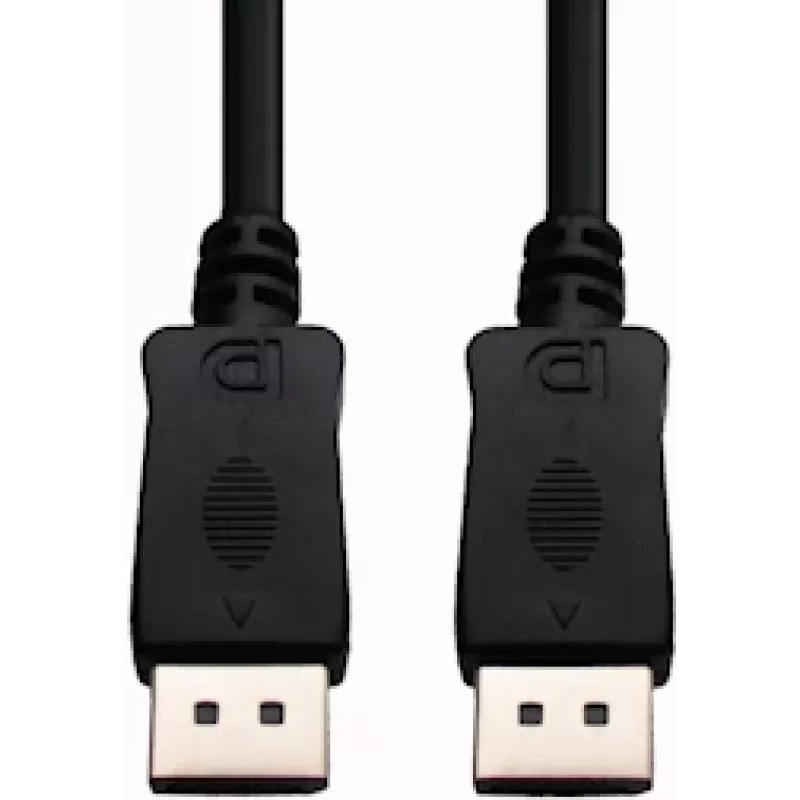
Cable DisplayPort e+p DP 2 2m

Cable DisplayPort e+p DP 2 2m
30,22 €
The e+p DP 2 DisplayPort cable, 2 meters in length, provides a straightforward wired connection between DisplayPort-equipped devices. With DisplayPort connectors on both ends, this cable supports transmission of high-quality digital video and audio signals. Packaged in a blister, the cable is intend... Leer más
Stock 6 Código 2257386 Marca E+P Modelo 1538000 Garantía 2 años

Envíos y devoluciones

Entrega estimada Martes, Octubre 20
Te mantendremos informado a través de nuestro sistema de seguimiento detallado
Opciones de pago
Tarjeta bancariaVisaMastercardPayPalApple PayGoogle PayTransferencia bancaria

The e+p DP 2 DisplayPort cable, 2 meters in length, provides a straightforward wired connection between DisplayPort-equipped devices. With DisplayPort connectors on both ends, this cable supports transmission of high-quality digital video and audio signals. Packaged in a blister, the cable is intended for single-user installation and offers a simple solution for connecting monitors, projectors, docking stations or graphics cards to compatible displays.

Advantages

The cable delivers a reliable physical connection with low signal loss for standard DisplayPort implementations. Its 2 m length allows flexible placement of devices without needing extenders. The matched DisplayPort connectors at each end ensure compatibility with devices that use the DisplayPort interface and allow combined audio and video transmission over a single cable.

Suitable for

  • Connecting a desktop GPU to a DisplayPort monitor
  • Linking a laptop docking station to an external display
  • Connecting a projector or conference-room display with DisplayPort input
  • Replacing a damaged or missing DisplayPort cable for home or office setups

Key specifications

  • Cable type: DisplayPort to DisplayPort
  • Length: 2 meters
  • Connectors: DisplayPort male on both ends
  • Signal type: Digital video and audio
  • Packaging: Blister pack containing one cable

How to use

Insert one DisplayPort connector into the DisplayPort output on the source device (for example a PC graphics card or docking station) and the other connector into the DisplayPort input on the target device (monitor or projector). Ensure connectors are fully seated and, if present, engage any latch mechanism to secure the connection. After connecting, select the appropriate input on the display and configure display settings in the operating system or graphics driver as needed.

Recommendations

For best results, route the cable to avoid tight bends and sharp kinks, and avoid running it alongside high-power mains cables to reduce potential interference. Check that both devices support the desired resolution and refresh rate over DisplayPort; if you experience display issues, try a different port on the source device or update the graphics driver.

Aspectos destacados
  • Connecting a desktop GPU to a DisplayPort monitor
  • Linking a laptop docking station to an external display
  • Connecting a projector or conference-room display with DisplayPort input
  • Replacing a damaged or missing DisplayPort cable for home or office setups
  • Cable type: DisplayPort to DisplayPort
  • Length: 2 meters
  • Connectors: DisplayPort male on both ends
  • Signal type: Digital video and audio
  • Packaging: Blister pack containing one cable
Especificaciones
Cantidad por paquete
1 pc(s)
Color del producto
Black
Conector 1
DisplayPort
Conector 2
DisplayPort
Género del conector 1
Male
Género del conector 2
Male
Longitud del cable
2 m
Recubrimiento de los contactos del conector
Gold
Tipo de embalaje
Blister
Historial de precios de los últimos 6 meses
Cable DisplayPort e+p DP 2 2m
Actual
30,22 €
Mínimo
26,33 €
Máximo
30,22 €
Variación 24 h
+2,12 €   +8%
Semana
+3,80 €   +14%
Mes
—   

Productos populares en esta categoría

Hola, soy el asistente de IA de DistriNode. Puedo ayudarte a encontrar productos, comparar opciones, crear presupuestos en PDF o abrir solicitudes de soporte.