
Cuenta Contacto
Tu carrito
Envío con DPD y FedEx
¿Dudas? Pregunte a la IA

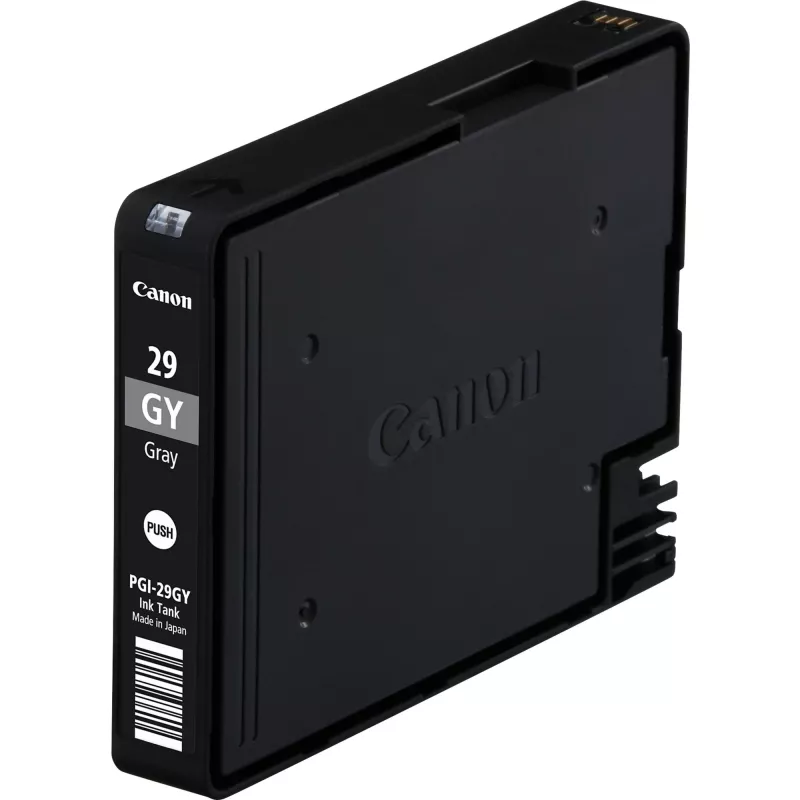
Cartucho de tinta Canon PGI-29 GY gris

Cartucho de tinta Canon PGI-29 GY gris
34,37 €
The Canon PGI-29 GY Grey ink cartridge is an original Canon pigment-based grey ink designed for reliable, high-density printing. Part of the LUCIA professional ink range, this grey cartridge delivers stable colour reproduction and long-lasting prints suitable for both photos and documents. The 36 ml... Leer más
Stock 1 Código 361528 Marca Canon Modelo 4871B001 Garantía 2 años

Envíos y devoluciones

Entrega estimada Miércoles, Octubre 14
Te mantendremos informado a través de nuestro sistema de seguimiento detallado
Opciones de pago
Tarjeta bancariaVisaMastercardPayPalApple PayGoogle PayTransferencia bancaria

The Canon PGI-29 GY Grey ink cartridge is an original Canon pigment-based grey ink designed for reliable, high-density printing. Part of the LUCIA professional ink range, this grey cartridge delivers stable colour reproduction and long-lasting prints suitable for both photos and documents. The 36 ml ink volume supports extended printing between replacements and is compatible with select Canon printers that accept the PGI-29 GY cartridge (MPN 4871B001).

Advantages

The pigment formulation provides strong colour density, excellent gamut for greyscale and fine detail, and improved photo permanence compared with dye-based inks. As an original Canon cartridge, it is engineered for consistent performance and reliable printer communication, reducing the risk of errors or poor print quality.

Suitable for

  • High-quality photo printing in grey tones
  • Professional documents and proofing that require neutral greys
  • Large-format or A3+ photographic prints and proofs
  • Frequent printing situations where less frequent cartridge changes are preferred

Key specifications

  • Brand compatibility: Canon
  • Type: Original pigment ink cartridge
  • Colour: Grey (GY)
  • Volume: 36 ml
  • Manufacturer part number (MPN): 4871B001

How to use

Install the Canon PGI-29 GY cartridge according to your printer’s user manual: power on the printer, open the cartridge access cover, remove protective seals from the cartridge, and insert it into the designated grey ink slot until it clicks into place. After installation, run any recommended cartridge alignment or cleaning cycles from the printer’s menu to ensure optimal print quality.

Recommendations

Store unused cartridges in a cool, dry place away from direct sunlight. For best results in photo printing, allow newly installed cartridges to complete any priming cycles and perform occasional nozzle checks and head cleanings when prints show banding or fading.
Aspectos destacados
  • Genuine Canon Ink produces on average 35% more quality prints than imitation cartridges†††
  • Genuine Canon Ink provides consistent quality prints 100% of the time†††
  • Genuine Canon Ink is 100% reliable so you can print with less stress†††
  • Return every ink and toner cartridge to be reused or recycled. It's free, easy and environmentally friendly.
  • Original
  • Print technology: Inkjet printing
  • Printing colours: Grey
  • Colour ink type: Pigment-based ink
  • Colour ink page yield: 790 pages
  • Brand compatibility: Canon
  • 1 pc(s)
Especificaciones
Cantidad por paquete
1 pc(s)
Código del Sistema Armonizado (HS)
84439990
Colores de impresión
Grey
Compatibilidad
PIXMA PRO-1
Compatibilidad con marcas
Canon
País de origen
Japan
Rendimiento de páginas de la tinta de color
790 pages
Tecnología de impresión
Inkjet printing
Tipo
Original
Tipo de embalaje
Box
Tipo de tinta
Pigment-based ink
Tipo de tinta de color
Pigment-based ink

Folleto

Abrir documento
Historial de precios de los últimos 6 meses
Cartucho de tinta Canon PGI-29 GY gris
Actual
34,37 €
Mínimo
33,75 €
Máximo
58,13 €
Variación 24 h
+0,49 €   +1%
Semana
-20,50 €   -37%
Mes
-21,64 €   -39%

Productos populares en esta categoría

Hola, soy el asistente de IA de DistriNode. Puedo ayudarte a encontrar productos, comparar opciones, crear presupuestos en PDF o abrir solicitudes de soporte.