
Cuenta Contacto
Tu carrito
Envío con DPD y FedEx
¿Dudas? Pregunte a la IA

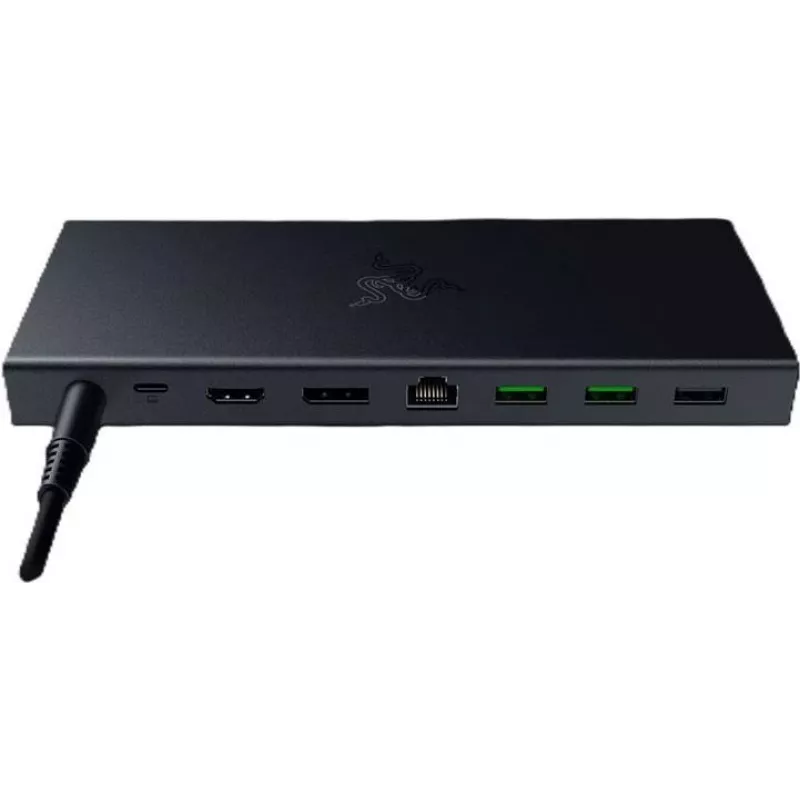
Docking station Razer NB Acc Dock USB-C 4 RC21-02280100-R3EK

Docking station Razer NB Acc Dock USB-C 4 RC21-02280100-R3EK
271,27 €
The Razer NB Acc Dock USB-C 4 is a compact USB-C docking station designed to extend connectivity for compatible laptops and workstations. It centralizes peripheral connections, external displays, wired network access and power delivery to create a more organized workspace. The dock supports multiple... Leer más
Stock 62 Código 2524410 Marca RAZER Modelo RC21-02280100-R3EK Garantía 2 años

Envíos y devoluciones

Entrega estimada Viernes, Octubre 16
Te mantendremos informado a través de nuestro sistema de seguimiento detallado
Opciones de pago
Tarjeta bancariaVisaMastercardPayPalApple PayGoogle PayTransferencia bancaria

The Razer NB Acc Dock USB-C 4 is a compact USB-C docking station designed to extend connectivity for compatible laptops and workstations. It centralizes peripheral connections, external displays, wired network access and power delivery to create a more organized workspace. The dock supports multiple display outputs and a variety of I/O ports to accommodate common office, home and mobile setups.

Advantages

This docking station provides a wide range of ports in a single unit, reducing the need for multiple adapters. With support for high-resolution display outputs and dedicated USB-C data ports, it enables fast data transfer and multi-monitor configurations. The integrated Ethernet and card reader add convenience for wired networking and media workflows, while the audio jack preserves compatibility with headsets and speakers. Overall, the dock simplifies cable management and streamlines connection of peripherals and power.

Suitable for

  • Office workstations that require multiple monitors and wired Ethernet
  • Home offices and remote work setups needing centralized peripheral connections
  • Content creators who use SD cards and high-bandwidth external drives
  • Mobile professionals who want a single connection to transform a laptop into a desktop setup

When it may not be suitable

The dock is intended for devices with compatible USB-C or USB4 ports and may not provide full functionality with older USB standards or proprietary laptop connectors. Devices that lack the required host-side support for certain display protocols or power delivery profiles may not be able to use all features simultaneously. Verify your laptop’s USB-C capabilities and display output limits before relying on multi-monitor or maximum-resolution configurations.

Key specifications

  • Display outputs: HDMI 2.1 and DisplayPort 1.4 support for high refresh rates and resolutions
  • USB ports: multiple USB-A and USB-C ports with Gen1/Gen2 bandwidth options and up to 10 Gbps on supported ports
  • Card reader: SD UHS-II slot for fast media transfers
  • Network: Gigabit Ethernet port for wired network connections
  • Audio: 3.5 mm headset/speaker jack
  • Power delivery: supports external power passthrough suitable for charging compatible laptops and powering peripherals

How to use

Connect the dock to a compatible laptop using the primary USB-C connection. Attach displays to the HDMI and DisplayPort outputs and plug peripherals into the USB-A and USB-C ports as needed. Insert SD cards into the card reader for file transfers and connect a wired network cable to the Ethernet port for stable internet. Ensure the dock is connected to its power adapter when using multiple high-power devices or charging a laptop to provide sufficient power delivery.

What to consider before purchase

  • Check that your laptop’s USB-C port supports the necessary alternate modes (DisplayPort/USB4) and power delivery profiles.
  • Confirm the maximum external display resolutions and refresh rates your laptop can drive when using a dock.
  • Consider the total power requirements if you plan to charge a laptop while powering multiple peripherals.
  • Verify physical space and cable routing on your desk for the dock and connected devices.

Recommendations

For reliable performance, connect the dock to its external power supply before attaching multiple displays or high-draw USB devices. Use certified high-speed cables for 4K/120 Hz or 4K/240 Hz display connections and keep device firmware and host drivers up to date to ensure compatibility with display and USB protocols.

Aspectos destacados
  • Office workstations that require multiple monitors and wired Ethernet
  • Home offices and remote work setups needing centralized peripheral connections
  • Content creators who use SD cards and high-bandwidth external drives
  • Mobile professionals who want a single connection to transform a laptop into a desktop setup
  • Display outputs: HDMI 2.1 and DisplayPort 1.4 support for high refresh rates and resolutions
  • USB ports: multiple USB-A and USB-C ports with Gen1/Gen2 bandwidth options and up to 10 Gbps on supported ports
  • Card reader: SD UHS-II slot for fast media transfers
  • Network: Gigabit Ethernet port for wired network connections
  • Audio: 3.5 mm headset/speaker jack
  • Power delivery: supports external power passthrough suitable for charging compatible laptops and powering peripherals
  • Check that your laptop’s USB-C port supports the necessary alternate modes (DisplayPort/USB4) and power delivery profiles.
  • Confirm the maximum external display resolutions and refresh rates your laptop can drive when using a dock.
  • Consider the total power requirements if you plan to charge a laptop while powering multiple peripherals.
  • Verify physical space and cable routing on your desk for the dock and connected devices.
Historial de precios de los últimos 6 meses
Docking station Razer NB Acc Dock USB-C 4 RC21-02280100-R3EK
Actual
271,27 €
Mínimo
224,87 €
Máximo
283,68 €
Variación 24 h
+0,36 €   +0%
Semana
+1,44 €   +1%
Mes
+1,89 €   +1%

Productos populares en esta categoría

Hola, soy el asistente de IA de DistriNode. Puedo ayudarte a encontrar productos, comparar opciones, crear presupuestos en PDF o abrir solicitudes de soporte.