
Cuenta Contacto
Tu carrito
Envío con DPD y FedEx
¿Dudas? Pregunte a la IA

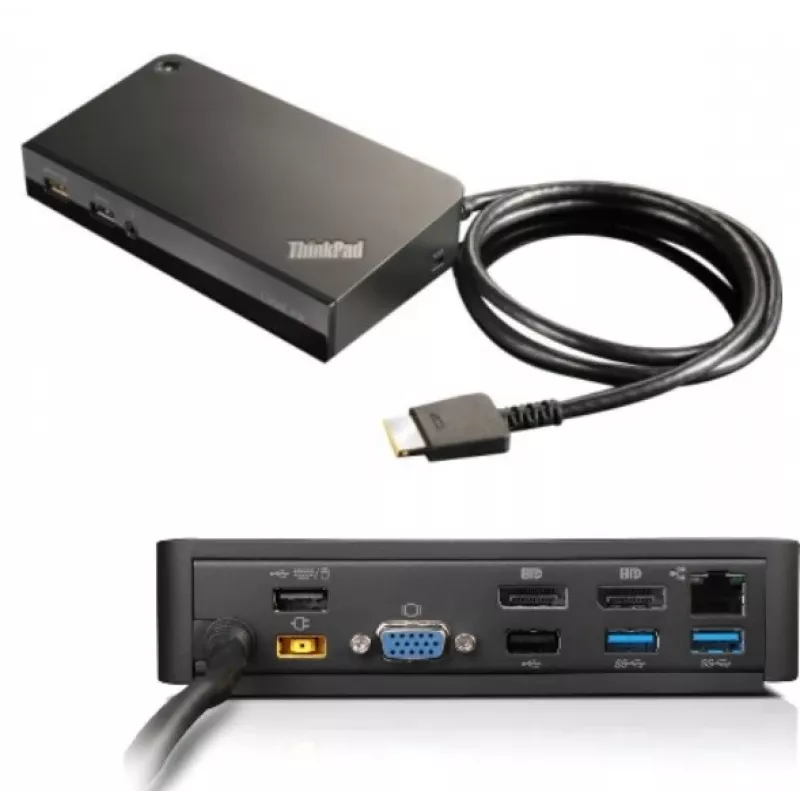
Docking station/replicador de puertos para portátil Lenovo 03X6300 con cable OneLink+ Negro

Docking station/replicador de puertos para portátil Lenovo 03X6300 con cable OneLink+ Negro
222,48 €
The Lenovo 03X6300 Docking Station provides a compact wired expansion hub for laptops equipped with the OneLink+ interface. Designed to increase desktop connectivity, this black docking station delivers multiple USB ports, a Gigabit Ethernet RJ-45 socket and a VGA output for connecting external disp... Leer más
Stock 2 Código 1167144 Marca LENOVO Modelo 03X6300 Garantía 2 años

Envíos y devoluciones

Entrega estimada Jueves, Octubre 29
Te mantendremos informado a través de nuestro sistema de seguimiento detallado
Opciones de pago
Tarjeta bancariaVisaMastercardPayPalApple PayGoogle PayTransferencia bancaria

The Lenovo 03X6300 Docking Station provides a compact wired expansion hub for laptops equipped with the OneLink+ interface. Designed to increase desktop connectivity, this black docking station delivers multiple USB ports, a Gigabit Ethernet RJ-45 socket and a VGA output for connecting external displays. A 3.5 mm audio jack supports headphones or external speakers, making the dock suitable for common office and home workstation setups.

Advantages

The docking station consolidates wired connectivity into a single unit to reduce cable clutter and simplify device connections. With four USB 3.2 Gen 1 Type-A ports and two USB 2.0 ports, it supports simultaneous connection of high-speed peripherals and legacy devices. The integrated Gigabit Ethernet port ensures reliable wired network performance at 10/100/1000 Mbit/s, while the VGA output allows connection to older monitors or projectors. Its compact black housing provides a discreet footprint that fits on crowded desks.

Suitable for

  • Expanding laptop connectivity in office and remote work environments
  • Connecting multiple USB peripherals such as external drives, keyboards and mice
  • Establishing stable wired network access for video calls and large file transfers
  • Using legacy VGA displays or projectors alongside modern laptop hardware
  • Setting up a simple workstation with external audio via the 3.5 mm jack

Key specifications

  • Interface: OneLink+ (wired docking connection)
  • USB ports: 4 × USB 3.2 Gen 1 (Type-A), 2 × USB 2.0
  • Network: 1 × Gigabit Ethernet (RJ-45), 10/100/1000 Mbit/s
  • Video output: 1 × VGA (D-Sub)
  • Audio: 3.5 mm headphone jack
  • Colour: Black

How to use

Connect the docking station to a compatible laptop using the OneLink+ connector. After attaching the dock, plug external devices into the available USB ports and connect a wired network cable to the RJ-45 port if required. Attach a VGA cable to an external monitor or projector and connect headphones or speakers to the 3.5 mm jack. Most operating systems will automatically detect connected USB devices and the Ethernet interface; install any device drivers if prompted by the system for full functionality.

Recommendations

Place the docking station on a stable, flat surface near your laptop and router for easy cable routing. Use the USB 3.2 Gen 1 ports for high-bandwidth peripherals (external SSDs, webcams) and reserve USB 2.0 ports for keyboards, mice or low-speed accessories. For optimal network performance, use a quality Cat5e or Cat6 Ethernet cable and avoid long, damaged cables. If the system requests drivers after first connection, follow the laptop manufacturer's guidance to install the correct OneLink+ or docking drivers.

Aspectos destacados
  • Expanding laptop connectivity in office and remote work environments
  • Connecting multiple USB peripherals such as external drives, keyboards and mice
  • Establishing stable wired network access for video calls and large file transfers
  • Using legacy VGA displays or projectors alongside modern laptop hardware
  • Setting up a simple workstation with external audio via the 3.5 mm jack
  • Interface: OneLink+ (wired docking connection)
  • USB ports: 4 × USB 3.2 Gen 1 (Type-A), 2 × USB 2.0
  • Network: 1 × Gigabit Ethernet (RJ-45), 10/100/1000 Mbit/s
  • Video output: 1 × VGA (D-Sub)
  • Audio: 3.5 mm headphone jack
  • Colour: Black
Especificaciones
Color del producto
Black
Conectividad de auriculares
3.5 mm
Entrada de micrófono
No
Ethernet LAN
Yes
Interfaz de host
OneLink+
Lector de tarjetas integrado
No
Número de puertos DisplayPort
2
Número de puertos HDMI
0
Número de puertos USB 2.0
2
Número de puertos USB 3.2 Gen 1 (3.1 Gen 1) tipo A
4
Número de puertos VGA (D-Sub)
1
Puerto combinado de auriculares/micrófono
Yes
Puertos Ethernet LAN (RJ-45)
1
Ranura para cable de seguridad
Yes
Salidas de auriculares
0
Tecnología de conectividad
Wired
Velocidades de datos de Ethernet LAN
10,100,1000 Mbit/s

Folleto

Abrir documento
Historial de precios de los últimos 6 meses
Docking station/replicador de puertos para portátil Lenovo 03X6300 con cable OneLink+ Negro
Actual
222,48 €
Mínimo
222,48 €
Máximo
225,96 €
Variación 24 h
-0,39 €   0%
Semana
-1,59 €   -1%
Mes
-2,85 €   -1%

Análisis independientes de medios tecnológicos

pcmag.comBrian
8/10

Veredicto: The OneLink Pro Dock works with several Lenovo-branded laptops, and provides USB, Ethernet, DisplayPort, and DVI connectivity...

Pros
  • Simple connectivity with OneLink cable. Adds lots of ports. Supports dual-monitor use
Contras
  • OneLink cable is not user-replaceable
Lee el análisis completo en pcmag.com →
notebookcheck.net

Veredicto: The Lenovo ThinkPad OneLink DockMany users will surely still prefer the convenience of a bottom-mounted docking station port (as can be found on traditional ThinkPad models), but for those who opt for an Edge-branded ThinkPad instead, the OneLink Dock see...

Lee el análisis completo en notebookcheck.net →

Productos populares en esta categoría

Vendedor: UAB KUR LT · Laisvės pr. 125A, LT-06118 Vilna, Lituania · Código de empresa 303192950 · NIF-IVA UE LT100008198612 · Envío desde la UE (Lituania)
Hola, soy el asistente de IA de DistriNode. Puedo ayudarte a encontrar productos, comparar opciones, crear presupuestos en PDF o abrir solicitudes de soporte.