
Cuenta Contacto
Tu carrito
Envío con DPD y FedEx
¿Dudas? Pregunte a la IA

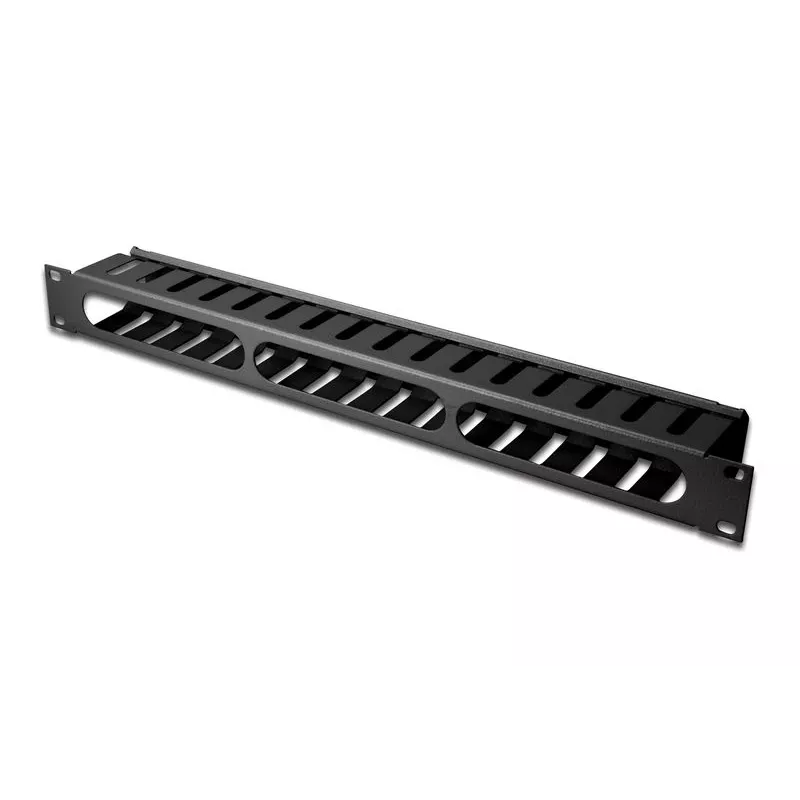
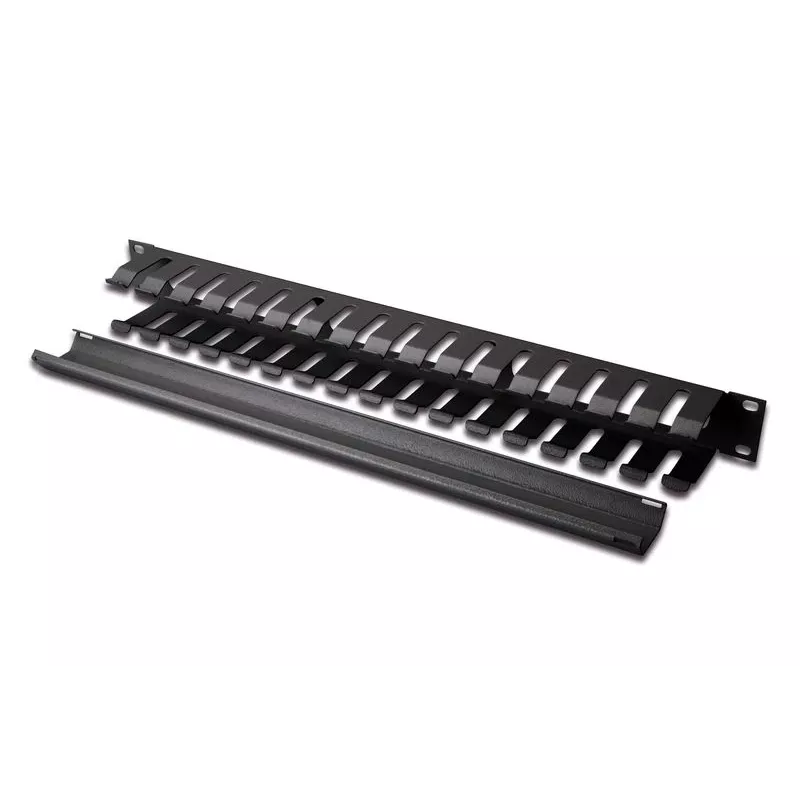
Equip panel de gestión de cables para montaje en rack de 19", negro

Equip panel de gestión de cables para montaje en rack de 19
Equip panel de gestión de cables para montaje en rack de 19", negro
18,60 €
The Equip 19" Rack Mount Cable Management Panel is a metal panel designed to organize cable routing and connections in datacom and networking environments. Finished in black and constructed from durable steel, the panel helps keep server racks tidy, reduces cable tangling and supports improved airfl... Leer más
Stock 100 Código 124676 Marca EQUIP Modelo 327313 Garantía 2 años

Envíos y devoluciones

Entrega estimada Viernes, Octubre 16
Te mantendremos informado a través de nuestro sistema de seguimiento detallado
Opciones de pago
Tarjeta bancariaVisaMastercardPayPalApple PayGoogle PayTransferencia bancaria

The Equip 19" Rack Mount Cable Management Panel is a metal panel designed to organize cable routing and connections in datacom and networking environments. Finished in black and constructed from durable steel, the panel helps keep server racks tidy, reduces cable tangling and supports improved airflow. Dimensions are 485 mm height, 70 mm width and 44.5 mm depth. Each pack contains one panel.

Advantages

The sturdy steel construction provides long-term durability while the black finish offers a neutral appearance that fits standard 19" rack installations. The panel’s compact 485 x 70 x 44.5 mm size allows installation in server cabinets and network racks without occupying excessive space. Using a dedicated cable management panel simplifies identification and routing of network and power cables.

Suitable for

  • Server racks and network cabinets
  • Datacom rooms and wiring closets
  • IT closets in offices and small data centers
  • Organizing Ethernet, power and patch cables

Key specifications

  • Brand: EQUIP
  • Model / MPN: 327313
  • EAN: 4015867226384
  • Product colour: Black
  • Material: Steel
  • Mounting: 19" rack mount
  • Dimensions (H×W×D): 485 × 70 × 44.5 mm
  • Qty per pack: 1 panel

How to use

Mount the panel in a standard 19" rack position using appropriate rack screws and cage nuts. Route network and power cables along the panel openings and secure them with cable ties or Velcro straps as needed. Ensure cables are not bent beyond their minimum bend radius and avoid over-tightening ties to prevent damage. Position the panel to separate cable types for clearer routing and easier maintenance.

Recommendations

For best results, install the panel near patch panels or switch ports to keep patch cables short. Use labelled ties or colour-coded markers to simplify identification during maintenance and avoid mixing high-voltage power cables with data cables in the same bundle to reduce interference.

Aspectos destacados
  • Server racks and network cabinets
  • Datacom rooms and wiring closets
  • IT closets in offices and small data centers
  • Organizing Ethernet, power and patch cables
  • Brand: EQUIP
  • Model / MPN: 327313
  • EAN: 4015867226384
  • Product colour: Black
  • Material: Steel
  • Mounting: 19" rack mount
  • Dimensions (H×W×D): 485 × 70 × 44.5 mm
  • Qty per pack: 1 panel
Especificaciones
Altura
485 mm
Altura del embalaje
485 mm
Ancho
70 mm
Ancho del embalaje
80 mm
Cantidad por paquete
1 pc(s)
Capacidad del rack
1U
Código del Sistema Armonizado (HS)
85389099
Color del producto
Black
Material de la carcasa
Steel
País de origen
China
Peso
600 g
Profundidad
44.5 mm
Profundidad del embalaje
50 mm
Tipo
Cable management panel

Folleto

Abrir documento
Historial de precios de los últimos 6 meses
Equip panel de gestión de cables para montaje en rack de 19", negro
Actual
18,60 €
Mínimo
17,47 €
Máximo
22,97 €
Variación 24 h
+1,06 €   +6%
Semana
+1,10 €   +6%
Mes
+1,12 €   +6%

Productos populares en esta categoría

Hola, soy el asistente de IA de DistriNode. Puedo ayudarte a encontrar productos, comparar opciones, crear presupuestos en PDF o abrir solicitudes de soporte.