
Cuenta Contacto
Tu carrito
Envío con DPD y FedEx
¿Dudas? Pregunte a la IA

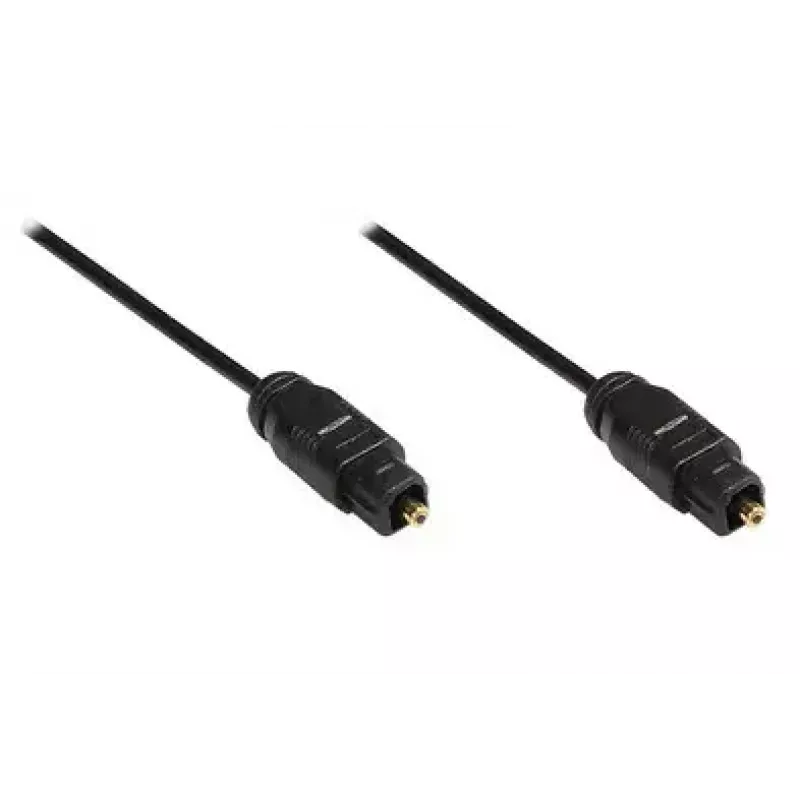
Cable de audio Alcasa 2m Toslink m/m

Cable de audio Alcasa 2m Toslink m/m
18,24 €
The Alcasa 2m Toslink m/m is a 2-meter optical audio cable with male TOSLINK connectors at both ends, designed for digital audio transmission between compatible devices. Its black exterior and standard fiber-optic connectors make it suitable for connecting soundbars, TVs, audio receivers and other e... Leer más
Stock 2 Código 2565310 Marca GoodConnections Modelo AO-4020 Garantía 2 años

Envíos y devoluciones

Entrega estimada Viernes, Octubre 23
Te mantendremos informado a través de nuestro sistema de seguimiento detallado
Opciones de pago
Tarjeta bancariaVisaMastercardPayPalApple PayGoogle PayTransferencia bancaria

The Alcasa 2m Toslink m/m is a 2-meter optical audio cable with male TOSLINK connectors at both ends, designed for digital audio transmission between compatible devices. Its black exterior and standard fiber-optic connectors make it suitable for connecting soundbars, TVs, audio receivers and other equipment that support S/PDIF optical input and output. The cable transfers digital audio signals using clear optical paths to reduce interference and maintain audio fidelity over short distances.

Advantages

This Toslink cable provides a reliable optical connection that is immune to electromagnetic interference common with coated copper cables. The 2 m length offers flexible placement of connected equipment without signal degradation over typical home and office distances. The molded connector ends ensure consistent mating with Toslink ports and help protect the optical ferrules from dust and damage.

Suitable for

  • Connecting a TV to a soundbar or home theater system
  • Linking an audio receiver to a CD player or media streamer with optical output
  • Connecting gaming consoles to AV receivers that accept optical audio
  • Setting up audio connections in living rooms, offices, or small studio environments

Key specifications

  • Cable length: 2 m
  • Connector type: TOSLINK (male) on both ends
  • Transmission medium: optical fiber (Toslink standard)
  • Colour: black

How to use

Locate the optical (TOSLINK) output on the source device and the optical input on the target device. Remove any protective caps from the cable connectors and align each TOSLINK plug with the corresponding port; the plug fits in one orientation. Gently insert the connector until it seats with a soft click. Switch the audio output settings on your source device to the optical output if required, and verify sound is routed to the connected device. When disconnecting, pull the connector straight out to avoid stressing the cable or port.

Recommendations

Keep connector ends covered when not in use to avoid contamination of the optical ferrules. Avoid sharp bends and excessive tension along the cable path to preserve internal optical fibers. For reliable performance, use this cable within its 2 m length for home or small-room setups and verify device compatibility with Toslink optical audio interfaces.

Aspectos destacados
  • Connecting a TV to a soundbar or home theater system
  • Linking an audio receiver to a CD player or media streamer with optical output
  • Connecting gaming consoles to AV receivers that accept optical audio
  • Setting up audio connections in living rooms, offices, or small studio environments
  • Cable length: 2 m
  • Connector type: TOSLINK (male) on both ends
  • Transmission medium: optical fiber (Toslink standard)
  • Colour: black
Especificaciones
Color del producto
Black
Conector 1
TOSLINK
Conector 2
TOSLINK
Diámetro del cable
2.2 mm
Género del conector 1
Male
Género del conector 2
Male
Longitud del cable
2 m
Historial de precios de los últimos 6 meses
Cable de audio Alcasa 2m Toslink m/m
Actual
18,24 €
Mínimo
17,69 €
Máximo
18,78 €
Variación 24 h
+0,50 €   +3%
Semana
+0,54 €   +3%
Mes
—   

Productos populares en esta categoría

Hola, soy el asistente de IA de DistriNode. Puedo ayudarte a encontrar productos, comparar opciones, crear presupuestos en PDF o abrir solicitudes de soporte.