
Cuenta Contacto
Tu carrito
Envío con DPD y FedEx
¿Dudas? Pregunte a la IA

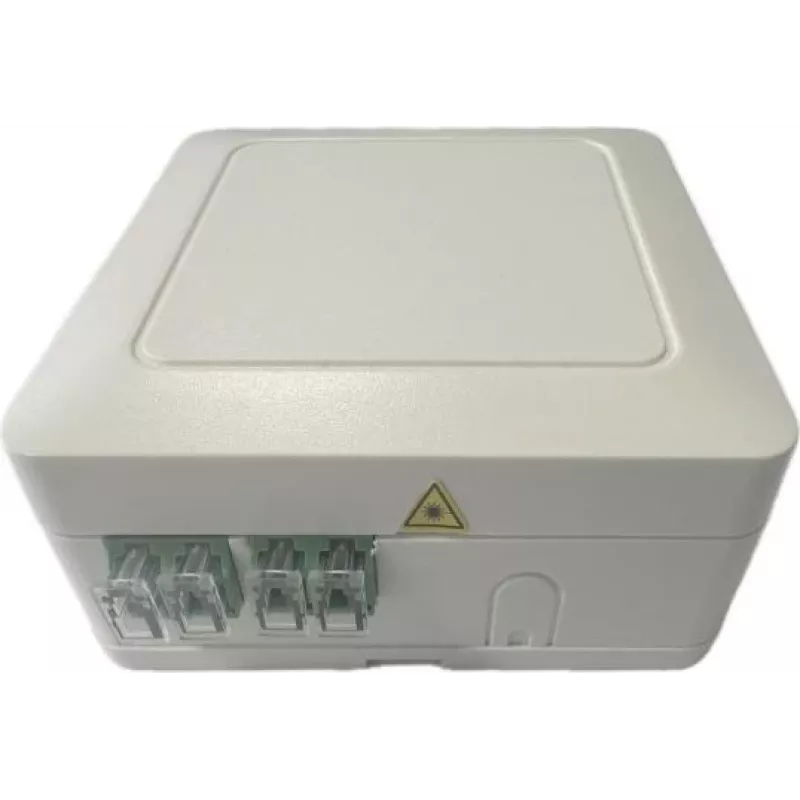
Optical Box Televes OB4BLCMINI — hasta 4 salidas, splitter óptico compacto

Optical Box Televes OB4BLCMINI — hasta 4 salidas, splitter óptico compacto
37,62 €
The Televes OB4BLCMINI optical box is a compact splitter designed to distribute an incoming fiber signal to up to four outputs while maintaining organized fiber management. Intended for small FTTH or network edge installations, the unit offers a passive splitting solution in a small footprint that f... Leer más
Stock AgotadoSin stock Código 2219589 Marca TELEVES Modelo OB4BLCMINI Garantía 2 años

Envíos y devoluciones

The Televes OB4BLCMINI optical box is a compact splitter designed to distribute an incoming fiber signal to up to four outputs while maintaining organized fiber management. Intended for small FTTH or network edge installations, the unit offers a passive splitting solution in a small footprint that fits constrained spaces and service terminals. The enclosure includes provisions for secure fiber routing and stable connector locations, making it suitable for installations where neat cabling and reliable passive distribution are required.

Advantages

The compact form factor reduces the space required for optical distribution points and simplifies placement in cabinets, wall boxes or service panels. Passive operation means no power supply is needed and splitting is achieved without active electronics, increasing reliability and lowering maintenance. The design supports tidy fiber routing and termination, helping to protect fiber ends and maintain optical performance over time.

Suitable for

  • Small FTTH subscriber termination points
  • Multiservice deployments in homes or small businesses
  • LAN edge distribution where up to four drops are required
  • Closely spaced installations with limited mounting area

Key specifications

  • Function: Passive optical splitter for single incoming fiber to multiple outputs
  • Number of outputs: Up to 4
  • Form factor: Compact wall- or panel-mountable enclosure suitable for tight spaces
  • Fiber management: Built-in routing and connector stabilization to protect terminations
  • Operation: No external power required (passive device)

How to use

Mount the optical box in the chosen location such as inside a subscriber cabinet, on a wall or in a service panel. Route the incoming fiber into the enclosure following the internal routing guides and secure it to avoid stress on the connector or fiber. Connect the incoming fiber to the input port and attach subscriber fibers to the output ports. Verify connectors are clean before mating to ensure optimal signal levels. Once connected, close the cover to protect terminations and maintain organized cable routing.

Recommendations

Use appropriate fiber cleaning tools before every connection and avoid sharp bends in the fiber near the enclosure. Install in an environment protected from excessive moisture and mechanical impact. For best optical performance, observe bend radius limits for the fiber and ensure connectors are compatible and properly seated.

Aspectos destacados
  • Small FTTH subscriber termination points
  • Multiservice deployments in homes or small businesses
  • LAN edge distribution where up to four drops are required
  • Closely spaced installations with limited mounting area
  • Function: Passive optical splitter for single incoming fiber to multiple outputs
  • Number of outputs: Up to 4
  • Form factor: Compact wall- or panel-mountable enclosure suitable for tight spaces
  • Fiber management: Built-in routing and connector stabilization to protect terminations
  • Operation: No external power required (passive device)
El historial de precios aún no está disponible
Todavía estamos recopilando suficientes datos de precios diarios de este producto.

Productos populares en esta categoría

Hola, soy el asistente de IA de DistriNode. Puedo ayudarte a encontrar productos, comparar opciones, crear presupuestos en PDF o abrir solicitudes de soporte.