
Cuenta Contacto
Tu carrito
Envío con DPD y FedEx
¿Dudas? Pregunte a la IA

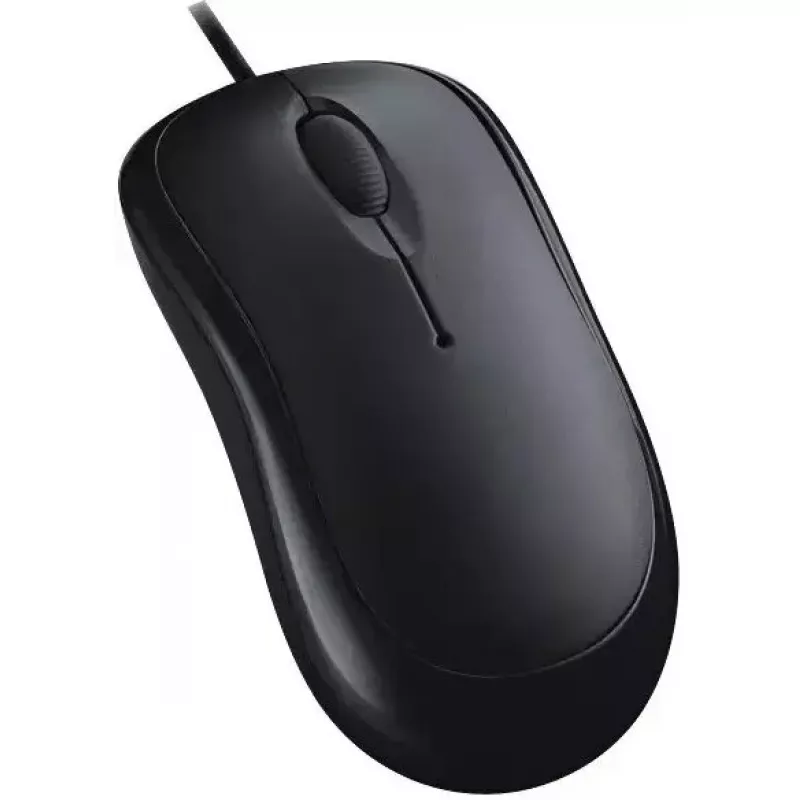
Ratón óptico USB con cable Dell FX92F 1000 DPI

Ratón óptico USB con cable Dell FX92F 1000 DPI
16,53 €
The Wired USB Optical Mouse Dell FX92F 1000 DPI is a compact, wired computer mouse designed for stable day-to-day input on desktops and laptops. It uses an optical sensor with 1000 DPI sensitivity and connects via a plug-and-play USB cable. The device features a standard three-button layout with an ... Leer más
Stock 94 Código 2574482 Marca DELL Modelo FX92F Garantía 2 años

Envíos y devoluciones

Entrega estimada Jueves, Octubre 22
Te mantendremos informado a través de nuestro sistema de seguimiento detallado
Opciones de pago
Tarjeta bancariaVisaMastercardPayPalApple PayGoogle PayTransferencia bancaria

The Wired USB Optical Mouse Dell FX92F 1000 DPI is a compact, wired computer mouse designed for stable day-to-day input on desktops and laptops. It uses an optical sensor with 1000 DPI sensitivity and connects via a plug-and-play USB cable. The device features a standard three-button layout with an integrated scroll wheel and a low-profile shape that fits typical office and home computing setups. Its wired connection removes the need for batteries and provides consistent responsiveness during extended use.

Advantages

The Dell FX92F offers reliable tracking with a 1000 DPI optical sensor that balances precision and ease of movement for everyday tasks. The plug-and-play USB interface enables immediate compatibility with common operating systems without additional drivers. Its three-button configuration and scroll wheel support common navigation and productivity actions, while the wired design ensures uninterrupted power and reduced input latency compared with wireless alternatives.

Suitable for

  • General office work: document editing, email, spreadsheet navigation
  • Web browsing and online research
  • Basic productivity tasks and home computing
  • Public or shared workstations where wired reliability is preferred

Key specifications

  • Connection: USB wired (plug-and-play)
  • Sensor type: Optical
  • Sensitivity: 1000 DPI
  • Buttons: Three-button design with scroll wheel
  • Form factor: Compact, low-profile ergonomic shape
  • Power: USB-powered (no batteries required)

How to use

Plug the mouse's USB connector into an available USB-A port on your computer; the device should be recognized automatically and be ready for immediate use. Place the mouse on a flat surface or mouse pad for stable tracking. Use the left and right buttons for standard selection and context actions, and use the scroll wheel to navigate documents and web pages. If pointer speed needs adjustment, change the mouse sensitivity or pointer settings through your operating system's control panel.

Recommendations

For best tracking performance, keep the optical sensor area free of dust and use the mouse on a non-reflective surface. For extended daily use, adjust pointer speed settings to reduce hand movement and consider an ergonomic mouse pad to improve comfort. When connecting to multiple devices, always insert the USB connector fully to ensure a stable wired connection.

Aspectos destacados
  • General office work: document editing, email, spreadsheet navigation
  • Web browsing and online research
  • Basic productivity tasks and home computing
  • Public or shared workstations where wired reliability is preferred
  • Connection: USB wired (plug-and-play)
  • Sensor type: Optical
  • Sensitivity: 1000 DPI
  • Buttons: Three-button design with scroll wheel
  • Form factor: Compact, low-profile ergonomic shape
  • Power: USB-powered (no batteries required)
Historial de precios de los últimos 6 meses
Ratón óptico USB con cable Dell FX92F 1000 DPI
Actual
16,53 €
Mínimo
14,90 €
Máximo
38,35 €
Variación 24 h
+0,35 €   +2%
Semana
+0,47 €   +3%
Mes
+0,34 €   +2%

Productos populares en esta categoría

Hola, soy el asistente de IA de DistriNode. Puedo ayudarte a encontrar productos, comparar opciones, crear presupuestos en PDF o abrir solicitudes de soporte.