
Cuenta Contacto
Tu carrito
Envío con DPD y FedEx
¿Dudas? Pregunte a la IA

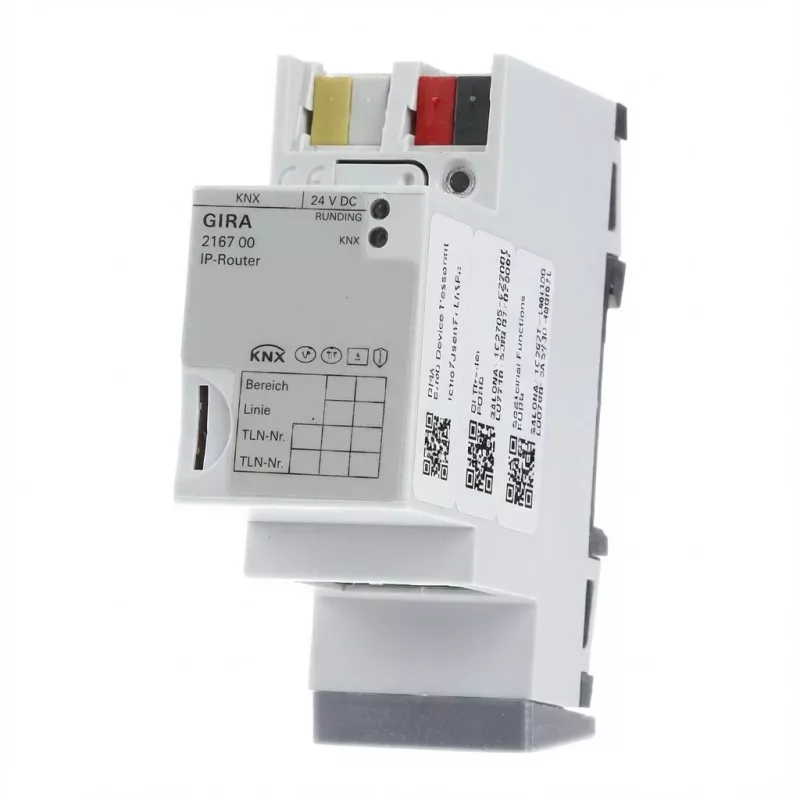
Router IP Gira REG 216700 para KNX/EIB — Modelo 216700, puerta de enlace de red

Router IP Gira REG 216700 para KNX/EIB — Modelo 216700, puerta de enlace de red
356,52 €
Gira IP router REG 216700 is a network gateway designed for KNX/EIB installations that routes KNX telegrams over IP networks. The device enables tunneling, routing and remote access between KNX bus systems and Ethernet, allowing engineering tools, controllers and visualization systems to communicate... Leer más
Stock 3 Código 1743199 Marca GIRA Modelo 216700 Garantía 2 años

Envíos y devoluciones

Entrega estimada Martes, Octubre 27
Te mantendremos informado a través de nuestro sistema de seguimiento detallado
Opciones de pago
Tarjeta bancariaVisaMastercardPayPalApple PayGoogle PayTransferencia bancaria

Gira IP router REG 216700 is a network gateway designed for KNX/EIB installations that routes KNX telegrams over IP networks. The device enables tunneling, routing and remote access between KNX bus systems and Ethernet, allowing engineering tools, controllers and visualization systems to communicate across IP-based infrastructures. It is intended for use in building automation projects where integration of KNX devices with networked services and secure remote engineering is required.

Advantages

The IP router offers reliable IP-based routing of KNX telegrams and supports multiple communication channels for simultaneous engineering and device access. It simplifies network integration by bridging bus and Ethernet layers while maintaining KNX protocol functionality. The router includes features for secure communication and remote tunneling, reducing the need for direct physical access to KNX lines during configuration and diagnostics.

Suitable for

Key specifications

How to use

Install the IP router in a suitable network cabinet or distribution area with access to both the KNX bus and the building Ethernet. Configure network parameters such as IP address, gateway and routing settings via the device’s configuration interface according to the project network plan. Use KNX engineering software to establish tunneling or routing sessions and verify communication between engineering tools, controllers and visualization systems. Follow standard KNX installation practices when connecting bus terminals and ensure power and network connections meet local regulations.

Recommendations

Place the router in a secure, ventilated location with stable network connectivity. Use segregated VLANs or firewall rules where appropriate to separate KNX management traffic from general office or guest networks. Regularly update router firmware and maintain backups of configuration files to support reliable remote engineering and system recovery.

Aspectos destacados
  • Connecting KNX/EIB installations to Ethernet networks for remote access and diagnostics
  • Engineering and commissioning KNX devices from networked engineering tools
  • Integrating controllers and visualization servers with KNX systems
  • Routing telegrams between separate KNX lines or areas via IP
  • Function: IP routing gateway between KNX bus system and Ethernet
  • Supported features: tunneling, routing and remote access for KNX telegrams
  • Network interface: Ethernet connectivity for integration with IP networks
  • Concurrency: supports simultaneous connections for engineering and device communication
  • Security: supports secure remote communication methods for engineering and tunneling
  • Application area: designed for building automation and KNX system integration
Especificaciones
Peso
0.14 kg
Historial de precios de los últimos 6 meses
Router IP Gira REG 216700 para KNX/EIB — Modelo 216700, puerta de enlace de red
Actual
356,52 €
Mínimo
315,00 €
Máximo
361,47 €
Variación 24 h
-1,89 €   -1%
Semana
-4,94 €   -1%
Mes
-3,13 €   -1%
Hola, soy el asistente de IA de DistriNode. Puedo ayudarte a encontrar productos, comparar opciones, crear presupuestos en PDF o abrir solicitudes de soporte.