
Cuenta Contacto
Tu carrito
Envío con DPD y FedEx
¿Dudas? Pregunte a la IA

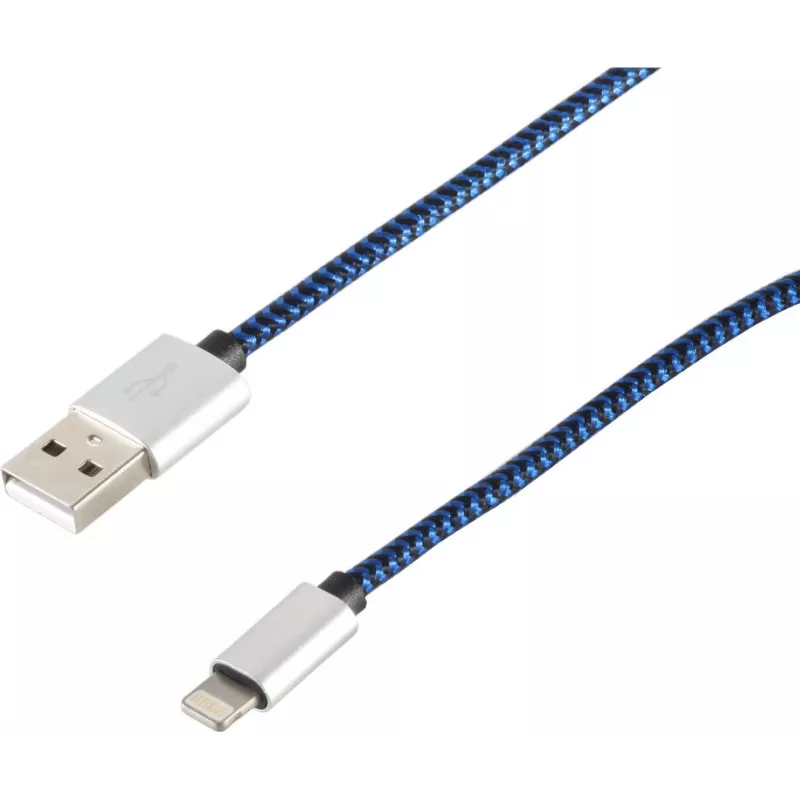
Cable Lightning S/CONN 14-50022 2m azul

Cable Lightning S/CONN 14-50022 2m azul
15,63 €
The ShiverPeaks Lightning Cable S/CONN 14-50022 2m Blue is a 2-metre cable with a Lightning connector on one end and a USB A connector on the other, designed for charging and syncing compatible Apple devices. The cable supports USB 2.0 data transfer speeds and provides extended reach for use at home... Leer más
Stock 14 Código 1493353 Marca SHIVERPEAKS Modelo 14-50022 Garantía 2 años

Envíos y devoluciones

Entrega estimada Viernes, Octubre 23
Te mantendremos informado a través de nuestro sistema de seguimiento detallado
Opciones de pago
Tarjeta bancariaVisaMastercardPayPalApple PayGoogle PayTransferencia bancaria

The ShiverPeaks Lightning Cable S/CONN 14-50022 2m Blue is a 2-metre cable with a Lightning connector on one end and a USB A connector on the other, designed for charging and syncing compatible Apple devices. The cable supports USB 2.0 data transfer speeds and provides extended reach for use at home, in the office or on the go. Its durable jacket and blue finish offer a practical combination of flexibility and visible styling.

Advantages

This Lightning to USB A cable delivers reliable power delivery and data connectivity for iPhone, iPad and other Lightning-equipped devices. The 2 m length reduces the need to stay close to power outlets, while the USB 2.0 support enables standard data syncing and charging. The cable’s construction is designed to resist everyday bending and handling, and the coloured finish makes it easy to identify among other cables.

Suitable for

  • Charging iPhone and iPad devices from USB A chargers, power banks or computer USB ports
  • Syncing photos, contacts and media between Lightning devices and computers
  • Using in living rooms, offices, cars and public charging stations where extra cable length is required
  • Replacement or spare cable for travel and extended-use setups

Key specifications

  • Connector 1: Lightning
  • Connector 2: USB A
  • USB version: USB 2.0
  • Cable length: 2 m
  • Colour: Blue

How to use

Connect the Lightning end to a compatible Apple device and the USB A end to a USB port on a computer, wall charger or power bank. Ensure the host device provides the appropriate output for charging; when connected to a computer, allow the device to establish a data connection for syncing. Avoid sharp bends near the connectors and unplug by grasping the connector rather than pulling on the cable to maintain longevity.

Recommendations

For best results, use with chargers and power banks rated for USB output. Store the cable loosely coiled to prevent kinks, keep it away from heat sources, and inspect connectors periodically for debris or damage. If faster charging is required, pair with a compatible higher-power charger and a USB A port that supports increased current, while ensuring device compatibility.

Aspectos destacados
  • Charging iPhone and iPad devices from USB A chargers, power banks or computer USB ports
  • Syncing photos, contacts and media between Lightning devices and computers
  • Using in living rooms, offices, cars and public charging stations where extra cable length is required
  • Replacement or spare cable for travel and extended-use setups
  • Connector 1: Lightning
  • Connector 2: USB A
  • USB version: USB 2.0
  • Cable length: 2 m
  • Colour: Blue
Especificaciones
Cantidad por paquete
1 pc(s)
Color del producto
Blue
Conector 1
Lightning
Conector 2
USB A
Formato del conector 1
Straight
Formato del conector 2
Straight
Longitud del cable
2 m
Material de la funda
Nylon
Versión de USB
USB 2.0
Historial de precios de los últimos 6 meses
Cable Lightning S/CONN 14-50022 2m azul
Actual
15,63 €
Mínimo
13,14 €
Máximo
30,23 €
Variación 24 h
+0,51 €   +3%
Semana
+2,48 €   +19%
Mes
-12,92 €   -45%

Productos populares en esta categoría

Hola, soy el asistente de IA de DistriNode. Puedo ayudarte a encontrar productos, comparar opciones, crear presupuestos en PDF o abrir solicitudes de soporte.