
Cuenta Contacto
Tu carrito
Envío con DPD y FedEx
¿Dudas? Pregunte a la IA

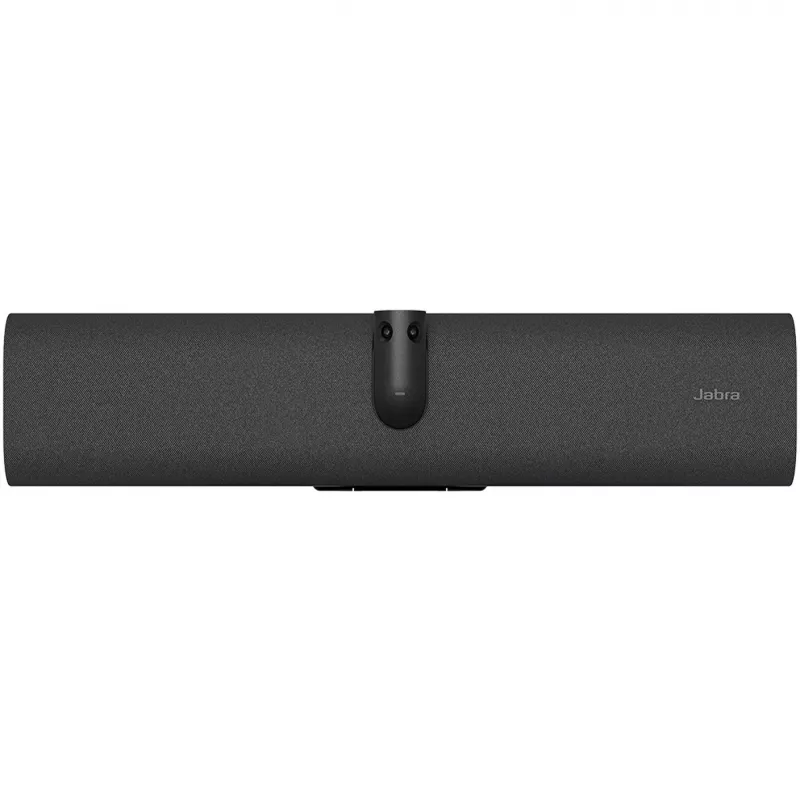
Videobar Jabra PanaCast 40 USB-C con cable de 3 m y soporte de pared integrado

Videobar Jabra PanaCast 40 USB-C con cable de 3 m y soporte de pared integrado
1.378,89 €
The video bar that slots into small meeting roomsThis outstanding video bar enables you to create a simple videoconferencing set up with a touchscreen, without the need for a touch controller.The small room video bar. For meetings your way.See more. Hear more. Include more.From huddle rooms to small... Leer más
Stock 2 Código 116970 Marca JABRA Modelo 8700-231 Garantía 2 años

Envíos y devoluciones

Entrega estimada Martes, Octubre 20
Te mantendremos informado a través de nuestro sistema de seguimiento detallado
Opciones de pago
Tarjeta bancariaVisaMastercardPayPalApple PayGoogle PayTransferencia bancaria
The video bar that slots into small meeting rooms

This outstanding video bar enables you to create a simple videoconferencing set up with a touchscreen, without the need for a touch controller.

The small room video bar. For meetings your way.

See more. Hear more. Include more.

From huddle rooms to small meeting rooms, PanaCast 40 VBS bar only can maximise every small meeting space. Its unique 180° field-of-view ensures everyone is seen and included – even those close to the screen, in the corner or sitting against the wall. No distortion. No blind spots. Just a 4K panoramic view of every in-room participant and a 4X digital zoom that captures the entire meeting space.

With outstanding audio, every voice is heard too.

- An array of beamforming, noise-cancelling microphones
- An impressive speaker
- Aux-Out for assistive listening devices

AI-powered features. More natural conversations.

There’s nothing quite like being face-to-face. But with its cutting-edge AI-powered video features, PanaCast 40 VBS bar only comes close.

Designed for more natural, productive hybrid meetings, it offers multiple views, tracks who’s talking, adjusts views, and brings speakers into focus – so remote participants feel just as present as those in the room.

From box to first meeting under minutes

Unique packaging designed for streamlined installation, with labelled windows enabling provisioning

Simply fix the integrated hinge to the wall or attach it to a VESA mount, table stand or tripod.

Clutter-free cable management for a no-fuss, clean with flexible deployment options.

Looking for the full system?

Check out the PanaCast 40 VBS here.

Secure and simple to manage

PanaCast 40 VBS bar only is built on the Microsoft Device Ecosystem Platform (MDEP) for robust security and peace of mind, and supported by our scalable, secure Jabra+ platform for remote management and updates of all your Jabra video devices in real-time.

Protect your investment for even longer with our Warranty+ add-on service to enjoy extended warranty coverage for up to five worry-free years.

CERTIFIED
PanaCast 40 VBS is certified for Microsoft Teams and Zoom Rooms to ensure a seamless experience.

Tailored services for a seamless workday

Make hybrid working a success with Jabra’s complete range of services

Maximize small meeting spaces

180° Field-of-View: Ensures everyone is seen, even those close to the screen or in the corner with no blind spots. 4K Panoramic view: Captures every in-room participant with a 4X digital zoom.

Outstanding Audio Quality

Array of beamforming, noise-cancelling microphones: Ensures every voice is heard clearly. HD speaker: Fills the room with immersive sound for natural conversations.

AI-Powered Features

Dynamic Composition: Close-ups of active speakers and room view simultaneously. Virtual Director: Real-time speaker tracking. Intelligent Zoom: Keeps everyone in the frame, even if they move. Intelligent Meeting Space: Sets virtual boundaries to focus on the meeting room participants.

Quick and Easy Installation

Streamlined set up.From box to meeting in under 12 minutes with a secure, wall-mounted installation. In-box provisioning: Configure without removing from the box and save time on rollouts. Flexible mounting options: Integrated hinge can be fixed directly to the wall, or attached to VESA mount, table stand, or tripod. Tidy cable management.

Seamless Integration

Seamless solution: For Microsoft Teams, includingExpress Install for Microsoft Teams Rooms, and Zoom. Flexible deployment: Use with Jabra touch controller, a touchscreen, or in permanent BYOD mode. Optional accessory: The Easy Clean Cover can be used to replace the fabric bar cover.

Secure and Manageable

Built on MDEP (Microsoft Device Ecosystem Platform): Secure & future-ready (Android 13 and beyond) Jabra+ : For remote management and real-time updates. Warranty+: Optional extended warranty coverage for up to five years.

How to use

Mount the video bar on a suitable wall location using the integrated wall mount so that the camera has an unobstructed view of the meeting area. Connect the device to a host computer using the supplied 3 m USB-C cable. The video bar is designed for plug-and-play operation; once connected, select it as the camera and audio device in your conferencing application. Adjust speaker volume and camera framing within the application or host system as required for the room and number of participants.

Recommendations

For best results, position the video bar at a height and angle that captures participants’ faces with minimal background obstructions. Use the full 3 m cable length to choose an optimal connection point near the meeting room’s host computer. Regularly check software settings and platform permissions to ensure the camera and microphone are selected and allowed by your conferencing application.

Aspectos destacados
  • Small meeting rooms and huddle spaces
  • Medium-sized conference rooms for up to typical occupant counts
  • Hybrid meetings combining in-room participants and remote attendees
  • Presentation setups where wall-mounted video capture is preferred
  • Camera: wide-angle panomorph optical system for panoramic coverage
  • Audio: integrated microphone array and speakers for two-way communication
  • Connectivity: USB-C connection with 3 m cable included for data and power
  • Installation: built-in wall mount for secure wall attachment
  • Compatibility: plug-and-play operation with common video-conferencing platforms and modern laptops
Especificaciones
Altavoces integrados
Yes
Altura
105 mm
Altura del embalaje
110 mm
Ancho
530 mm
Ancho del embalaje
589 mm
Bluetooth
Yes
Cables incluidos
HDMI, USB
Cámara de privacidad
Yes
Campo de visión horizontal
180°
Campo de visión vertical
50°
Cancelación de eco
Yes
Capacidad de streaming
Yes
Capacidad de zoom
Yes
Certificación
Microsoft Teams Rooms, Zoom Rooms,ADA
Color del producto
Black
Control PTZ
Yes
Gestión basada en web
Yes
Número de micrófonos
6
Número de puertos HDMI
1
Número de puertos USB 3.2 Gen 1 (3.1 Gen 1) tipo A
1
Número de puertos USB 3.2 Gen 1 (3.1 Gen 1) tipo C
1
Otros sistemas operativos compatibles
Android
Peso
1.8 kg
Peso del embalaje
4.19 kg
Profundidad
60 mm
Profundidad del embalaje
210 mm
Protocolos de red compatibles
(IP) IPv4, IPv6
Puertos Ethernet LAN (RJ-45)
1
Ranura para cable de seguridad
Yes
Reducción de ruido
Yes
Resolución máxima de vídeo
3840 x 1080 pixels
Salida de línea
Yes
Sensibilidad del micrófono
-37 dB
Sistemas operativos móviles compatibles
Android 13.0
Tensión de entrada de CA
100 - 240 V
Tipo de cámara
Dual camera
Tipo de privacidad
Privacy cover
Tipo de ranura para cable de seguridad
Kensington
Velocidades de datos de Ethernet LAN
10,100,1000 Mbit/s
Versión de Bluetooth
5.2
Wifi
Yes
Zoom digital
4x

Folleto

Abrir documento
Historial de precios de los últimos 6 meses
Videobar Jabra PanaCast 40 USB-C con cable de 3 m y soporte de pared integrado
Actual
1.378,89 €
Mínimo
1.377,89 €
Máximo
1.450,59 €
Variación 24 h
-7,31 €   -1%
Semana
-19,12 €   -1%
Mes
-12,10 €   -1%

Productos populares en esta categoría

Hola, soy el asistente de IA de DistriNode. Puedo ayudarte a encontrar productos, comparar opciones, crear presupuestos en PDF o abrir solicitudes de soporte.