
Cuenta Contacto
Tu carrito
Envío con DPD y FedEx
¿Dudas? Pregunte a la IA

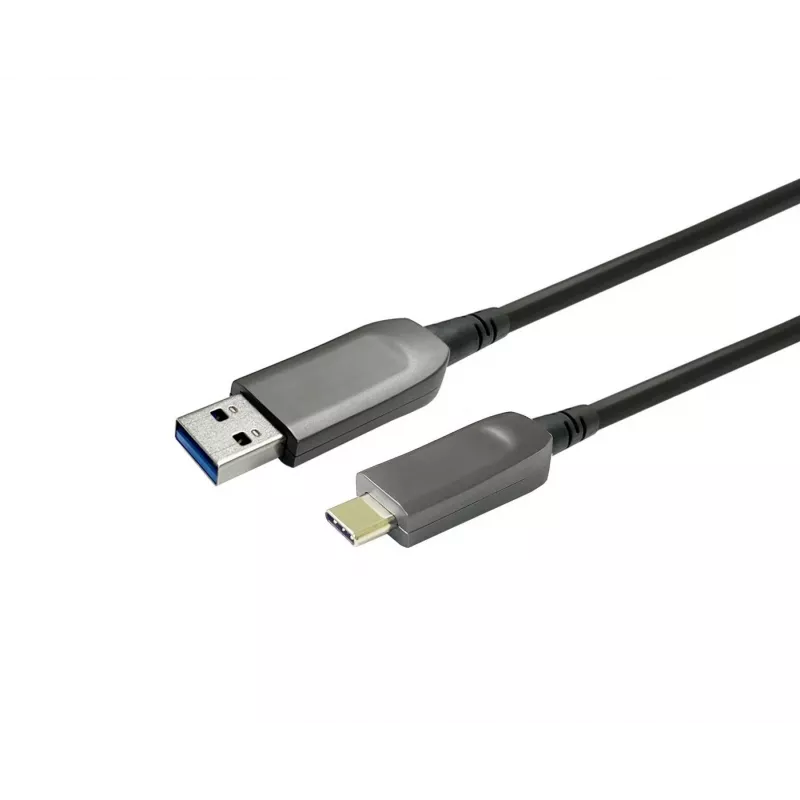
Vivolink PROUSBCAMMOP20 Cable USB USB 3.2 Gen 1 (3.1 Gen 1) 20 m USB C USB A Negro

Vivolink PROUSBCAMMOP20 Cable USB USB 3.2 Gen 1 (3.1 Gen 1) 20 m USB C USB A Negro
438,00 €
The Vivolink PROUSBCAMMOP20 is a 10 m Optical Fiber USB-C to USB-A cable designed for meeting and conference rooms. It provides a USB 3.2 Gen 1 (5 Gbit/s) connection between USB-C conference equipment and USB-A hubs or PCs. The cable features an integrated converter that supports both USB 3.0 and US... Leer más
Stock 24 Código 1185882 Marca VIVOLINK Modelo PROUSBCAMMOP20 Garantía 2 años

Envíos y devoluciones

Entrega estimada Jueves, Octubre 22
Te mantendremos informado a través de nuestro sistema de seguimiento detallado
Opciones de pago
Tarjeta bancariaVisaMastercardPayPalApple PayGoogle PayTransferencia bancaria

The Vivolink PROUSBCAMMOP20 is a 10 m Optical Fiber USB-C to USB-A cable designed for meeting and conference rooms. It provides a USB 3.2 Gen 1 (5 Gbit/s) connection between USB-C conference equipment and USB-A hubs or PCs. The cable features an integrated converter that supports both USB 3.0 and USB 2.0 data modes and is compatible with Logitech products.

Advantages

The cable offers long-reach connectivity over 10 metres while maintaining high-speed data transfer up to 5 Gbit/s. Its optical-fiber construction reduces signal degradation over distance and the built-in converter ensures compatibility with USB 3.0 and USB 2.0 devices. The black design and lightweight construction make it convenient for permanent installations in meeting rooms or temporary setups.

Suitable for

  • Connecting USB-C conference cameras or devices to USB-A hubs or PCs
  • Meeting and conference room installations requiring long cable runs
  • Setups where compatibility with Logitech conference equipment is needed

Key specifications

  • Connector 1: USB C
  • Connector 2: USB A
  • USB version: USB 3.2 Gen 1 (5 Gbit/s)
  • Cable length: 10 m
  • Colour: Black
  • Weight: 0.05 kg
  • MPN: PROUSBCAMMOP20
  • EAN: 5715063071281

How to use

Connect the USB-C end to the conference camera or USB-C device and plug the USB-A end into a hub or PC. Ensure the host device supports USB 3.2 Gen 1 for maximum transfer speed; if not, the cable will fall back to USB 3.0 or USB 2.0 as supported. Route and secure the 10 m cable to avoid sharp bends and protect the optical fibres.

Recommendations

For optimal performance, use the cable with devices and hubs that support USB 3.2 Gen 1. Avoid tight loops and sharp bends; secure the cable along walls or conduits when installing in conference rooms. If you experience reduced speeds, verify host and peripheral USB versions and connections.
Aspectos destacados
  • Connecting USB-C conference cameras or devices to USB-A hubs or PCs
  • Meeting and conference room installations requiring long cable runs
  • Setups where compatibility with Logitech conference equipment is needed
  • Connector 1: USB C
  • Connector 2: USB A
  • USB version: USB 3.2 Gen 1 (5 Gbit/s)
  • Cable length: 10 m
  • Colour: Black
  • Weight: 0.05 kg
  • MPN: PROUSBCAMMOP20
  • EAN: 5715063071281
Especificaciones
Cantidad por paquete
1 pc(s)
Color del producto
Black
Conector 1
USB C
Conector 2
USB A
Formato del conector 1
Straight
Formato del conector 2
Straight
Género del conector 1
Male
Género del conector 2
Male
Longitud del cable
10 m
Material de la carcasa del conector
Plastic
Peso
0.05 kg
Peso del embalaje
60 g
Velocidad máxima de transferencia de datos
5 Gbit/s
Versión de USB
USB 3.2 Gen 1 (3.1 Gen 1)

Folleto

Abrir documento
Historial de precios de los últimos 6 meses
Vivolink PROUSBCAMMOP20 Cable USB USB 3.2 Gen 1 (3.1 Gen 1) 20 m USB C USB A Negro
Actual
438,00 €
Mínimo
438,00 €
Máximo
519,79 €
Variación 24 h
+0,00 €   +0%
Semana
-6,09 €   -1%
Mes
-5,42 €   -1%

Productos populares en esta categoría

Hola, soy el asistente de IA de DistriNode. Puedo ayudarte a encontrar productos, comparar opciones, crear presupuestos en PDF o abrir solicitudes de soporte.