
Cuenta Contacto
Tu carrito
Envío con DPD y FedEx
¿Dudas? Pregunte a la IA

Adaptador DVI-D a HDMI ACT AP1004

Adaptador DVI-D a HDMI ACT AP1004
23,86 €
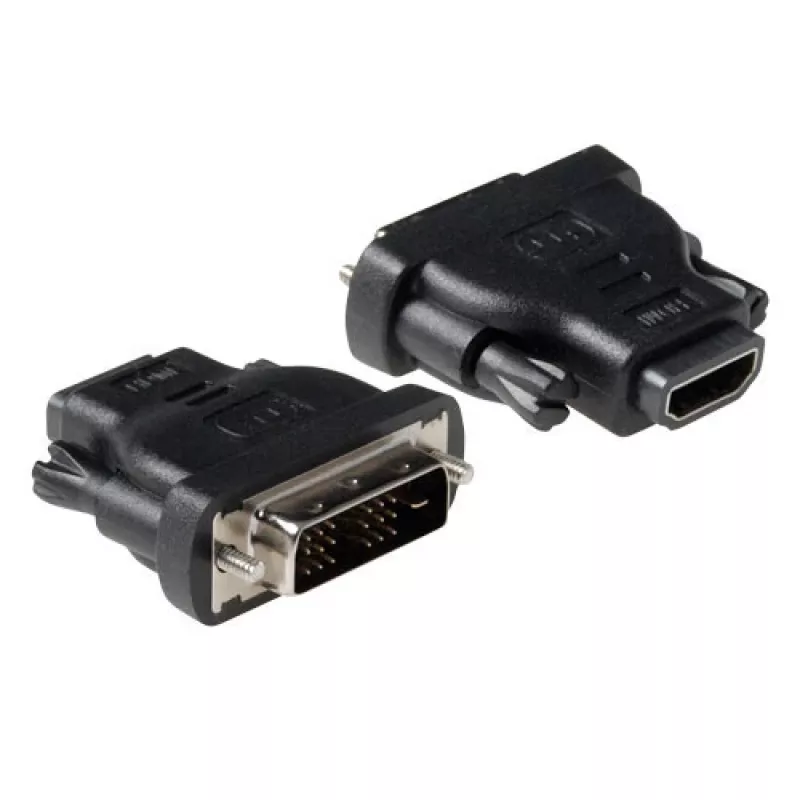
The ACT AP1004 DVI-D to HDMI adapter converts a DVI-D male connector to an HDMI A female port, enabling direct connection of DVI-equipped sources to HDMI displays. Its compact black housing provides a low-profile solution for transmitting digital video signals without active conversion electronics. ... Leer más
Stock 81 Código 2245897 Marca ACT Modelo AP1004 Garantía 2 años

Envíos y devoluciones

Entrega estimada Miércoles, Octubre 21
Te mantendremos informado a través de nuestro sistema de seguimiento detallado
Opciones de pago
Tarjeta bancariaVisaMastercardPayPalApple PayGoogle PayTransferencia bancaria

The ACT AP1004 DVI-D to HDMI adapter converts a DVI-D male connector to an HDMI A female port, enabling direct connection of DVI-equipped sources to HDMI displays. Its compact black housing provides a low-profile solution for transmitting digital video signals without active conversion electronics. The adapter is intended for video-only connections where the source outputs a single-link DVI-D signal compatible with HDMI display inputs.

Advantages

This adapter offers a simple plug-and-play interface with no software required and a small footprint that preserves desk and AV-rack space. The molded black connector and secure fit reduce the risk of accidental disconnection while providing consistent signal contact for high-quality digital video. Because it passes a DVI-D digital video signal directly to HDMI, it maintains native resolution and image clarity when used within supported signal parameters.

Suitable for

  • Connecting desktop or workstation DVI-D outputs to HDMI monitors or televisions
  • Linking older graphics cards with DVI-D ports to modern HDMI-only displays
  • Temporary AV setups where a compact adapter is preferred over cable replacement

Key specifications

  • Input connector: DVI-D male (digital video only)
  • Output connector: HDMI A female (digital video)
  • Signal type: Digital video pass-through (no audio conversion)
  • Colour: Black
  • Form factor: Compact, inline adapter

How to use

Insert the DVI-D male end into the DVI-D output of your source device until it seats securely. Connect an HDMI cable from the adapter’s HDMI A female port to the HDMI input on your display. Power on the source and the display; the display’s input selection should be set to the corresponding HDMI port. No driver installation is needed. Note that this adapter transmits digital video only and will not carry audio from a DVI-only source.

Recommendations

Use a high-quality HDMI cable for the connection from the adapter to the display to preserve signal integrity. Verify that your source outputs a compatible single-link DVI-D resolution and refresh rate supported by the target display. For setups requiring audio or HDMI features beyond basic video signaling, consider an active converter or a dedicated cable solution that supports audio embedding.
Aspectos destacados
  • Connecting desktop or workstation DVI-D outputs to HDMI monitors or televisions
  • Linking older graphics cards with DVI-D ports to modern HDMI-only displays
  • Temporary AV setups where a compact adapter is preferred over cable replacement
  • Input connector: DVI-D male (digital video only)
  • Output connector: HDMI A female (digital video)
  • Signal type: Digital video pass-through (no audio conversion)
  • Colour: Black
  • Form factor: Compact, inline adapter
Especificaciones
Color del producto
Black
Conector 1
DVI-D
Conector 2
HDMI A
Género del conector 1
Male
Género del conector 2
Female

Folleto

Abrir documento
Historial de precios de los últimos 6 meses
Adaptador DVI-D a HDMI ACT AP1004
Actual
23,86 €
Mínimo
23,26 €
Máximo
23,86 €
Variación 24 h
+0,35 €   +1%
Semana
+0,60 €   +3%
Mes
—   

Productos populares en esta categoría

Hola, soy el asistente de IA de DistriNode. Puedo ayudarte a encontrar productos, comparar opciones, crear presupuestos en PDF o abrir solicitudes de soporte.