
Cuenta Contacto
Tu carrito
Envío con DPD y FedEx
¿Dudas? Pregunte a la IA

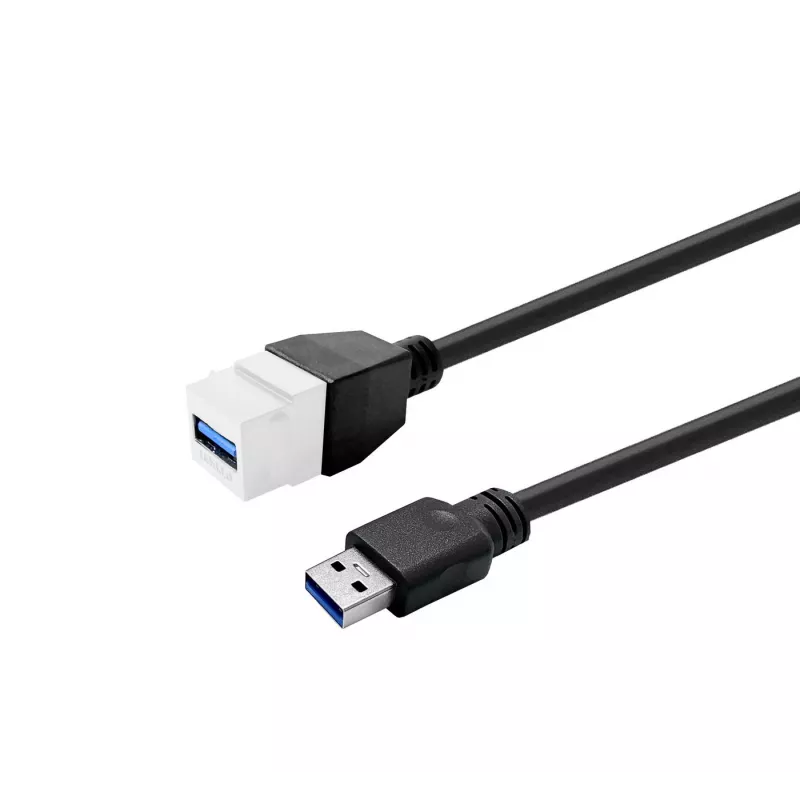
Cable alargador USB 3.0 A a A VivoLink PROKEYUSB3AFM5W blanco 5 m

Cable alargador USB 3.0 A a A VivoLink PROKEYUSB3AFM5W blanco 5 m
52,63 €
VivoLink PROKEYUSB3AFM5W is a white USB 3.0 A‑to‑A extension cable with a 5 m length designed to extend existing USB A connections while preserving high-speed data transfer capabilities. The cable supports USB 3.0 data rates and is backward compatible with USB 2.0 and USB 1.1 devices, enabling longe... Leer más
Stock 75 Código 1201497 Marca VIVOLINK Modelo PROKEYUSB3AFM5W Garantía 2 años

Envíos y devoluciones

Entrega estimada Miércoles, Octubre 21
Te mantendremos informado a través de nuestro sistema de seguimiento detallado
Opciones de pago
Tarjeta bancariaVisaMastercardPayPalApple PayGoogle PayTransferencia bancaria

VivoLink PROKEYUSB3AFM5W is a white USB 3.0 A‑to‑A extension cable with a 5 m length designed to extend existing USB A connections while preserving high-speed data transfer capabilities. The cable supports USB 3.0 data rates and is backward compatible with USB 2.0 and USB 1.1 devices, enabling longer reach for peripherals, external drives, hubs and other USB A equipment without relocating hardware.

Advantages

The cable provides consistent USB 3.0 performance over a 5 m span while remaining compatible with older USB standards. Its A‑to‑A connectors allow straightforward extension of host-to-device wiring where extra length is required. The white outer jacket offers a neutral aesthetic suitable for office and home environments, and the construction reduces the need for additional adapters or replacements of existing devices.

Suitable for

  • Extending connections to external hard drives and SSD enclosures
  • Lengthening cable runs for USB hubs and docking stations
  • Connecting peripherals such as keyboards, mice and webcams when extra reach is needed
  • Temporary or fixed setups where the original device cable is too short

Key specifications

  • Connector type: USB A male to USB A female (A‑to‑A extension)
  • Standard: USB 3.0 with backward compatibility to USB 2.0 and USB 1.1
  • Maximum length: 5 metres
  • Color: white
  • Primary use: data transfer and peripheral extension

How to use

Insert the male USB A plug into the host device or existing cable end and connect the female USB A receptacle to the peripheral or device cable that requires extension. Ensure connectors are fully seated to maintain optimal data transfer rates. For best results, avoid sharp bends, kinks or heavy strain at the connector ends and route the cable away from sources of strong electromagnetic interference.

Recommendations

To preserve USB 3.0 speeds over the 5 m extension, use with cables and devices that support SuperSpeed USB and avoid daisy-chaining multiple passive extensions. If longer or powered extension is required, consider an active extension or a powered USB hub to maintain stable performance.

Aspectos destacados
  • Extending connections to external hard drives and SSD enclosures
  • Lengthening cable runs for USB hubs and docking stations
  • Connecting peripherals such as keyboards, mice and webcams when extra reach is needed
  • Temporary or fixed setups where the original device cable is too short
  • Connector type: USB A male to USB A female (A‑to‑A extension)
  • Standard: USB 3.0 with backward compatibility to USB 2.0 and USB 1.1
  • Maximum length: 5 metres
  • Color: white
  • Primary use: data transfer and peripheral extension
Especificaciones
Color del producto
White
Versión de USB
USB 3.2 Gen 1 (3.1 Gen 1)

Folleto

Abrir documento
Historial de precios de los últimos 6 meses
Cable alargador USB 3.0 A a A VivoLink PROKEYUSB3AFM5W blanco 5 m
Actual
52,63 €
Mínimo
51,64 €
Máximo
60,45 €
Variación 24 h
+0,92 €   +2%
Semana
+0,84 €   +2%
Mes
+0,91 €   +2%

Productos populares en esta categoría

Hola, soy el asistente de IA de DistriNode. Puedo ayudarte a encontrar productos, comparar opciones, crear presupuestos en PDF o abrir solicitudes de soporte.