
Cuenta Contacto
Tu carrito
Envío con DPD y FedEx
¿Dudas? Pregunte a la IA

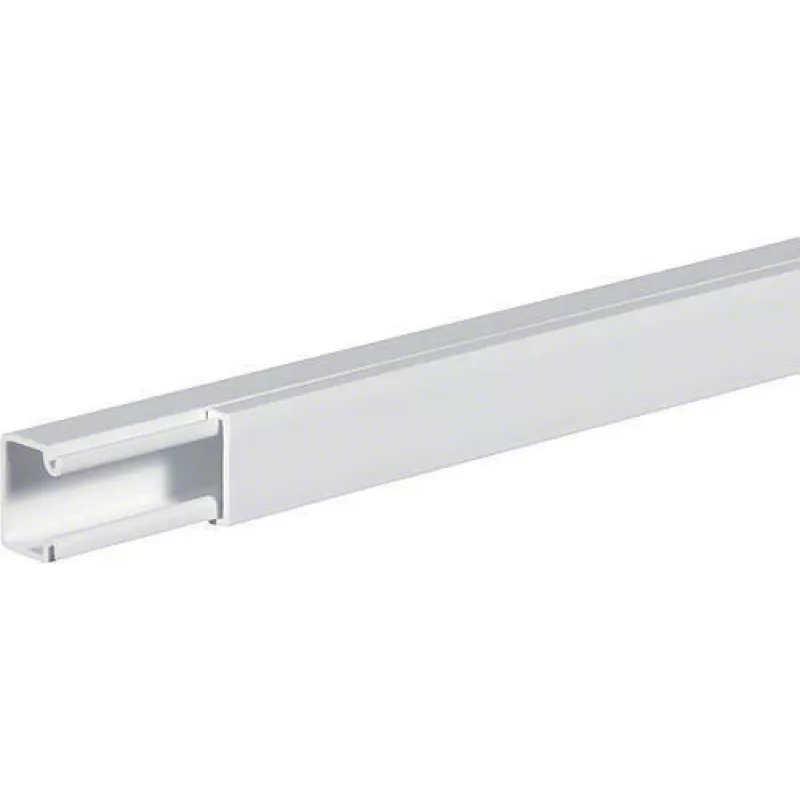
Canaleta de cables Vivolink VLC1156250 canaleta de cables recta blanca

Canaleta de cables Vivolink VLC1156250 canaleta de cables recta blanca
12,66 €
The Straight cable tray Vivolink VLC1156250 is a slim, white cable channel designed for horizontal mounting to conceal and route cables neatly. With dimensions of 12 mm width, 2000 mm length and 10 mm height, and a weight of approximately 500 g, it provides a discreet solution for organizing cables ... Leer más
Stock 50 Código 1210148 Marca VIVOLINK Modelo VLC1156250 Garantía 2 años

Envíos y devoluciones

Entrega estimada Viernes, Octubre 23
Te mantendremos informado a través de nuestro sistema de seguimiento detallado
Opciones de pago
Tarjeta bancariaVisaMastercardPayPalApple PayGoogle PayTransferencia bancaria

The Straight cable tray Vivolink VLC1156250 is a slim, white cable channel designed for horizontal mounting to conceal and route cables neatly. With dimensions of 12 mm width, 2000 mm length and 10 mm height, and a weight of approximately 500 g, it provides a discreet solution for organizing cables in offices, homes or commercial spaces. The tray includes double-sided tape on the back for straightforward surface attachment.

Advantages

This Vivolink cable tray is lightweight yet sturdy, offering a low-profile appearance that blends with interior surfaces. The white finish helps it remain unobtrusive along walls or skirting boards. Built-in double-faced tape simplifies installation without the immediate need for screws or brackets on suitable surfaces.

Suitable for

  • Concealing power and data cables along walls
  • Neat cable routing behind desks and entertainment units
  • Horizontal installations in offices, living rooms or retail spaces

Key specifications

  • Model: Vivolink VLC1156250 (11 562 50)
  • Dimensions: 12 mm (W) x 2000 mm (L) x 10 mm (H)
  • Colour: White
  • Weight: approx. 500 g
  • Mounting: double-sided tape on back side for surface attachment
  • Category: Cable Organizers

How to use

Measure and mark the desired horizontal run on a clean, dry surface. Cut the tray to length if necessary using a suitable saw. Remove the protective film from the double-sided tape on the back, align the tray with your markings and press firmly along its length to ensure adhesion. Route cables into the tray before closing any covers or end caps, following any local installation guidelines.

Recommendations

For best adhesion, apply to smooth, clean and dry surfaces at room temperature; avoid mounting on freshly painted or highly textured surfaces. For heavy cable bundles or long-term installations, consider additional mechanical fastening (screws or brackets) in accordance with local building practices.
Aspectos destacados
  • Concealing power and data cables along walls
  • Neat cable routing behind desks and entertainment units
  • Horizontal installations in offices, living rooms or retail spaces
  • Model: Vivolink VLC1156250 (11 562 50)
  • Dimensions: 12 mm (W) x 2000 mm (L) x 10 mm (H)
  • Colour: White
  • Weight: approx. 500 g
  • Mounting: double-sided tape on back side for surface attachment
  • Category: Cable Organizers
Especificaciones
Altura
10 mm
Ancho
12 mm
Cantidad
1
Código del Sistema Armonizado (HS)
85389099
Color del producto
White
Formato
Horizontal
Longitud
2 m
Peso del embalaje
500 g
Profundidad
2000 mm
Tipo
Straight cable tray

Folleto

Abrir documento
Historial de precios de los últimos 6 meses
Canaleta de cables Vivolink VLC1156250 canaleta de cables recta blanca
Actual
12,66 €
Mínimo
12,09 €
Máximo
49,45 €
Variación 24 h
+0,57 €   +5%
Semana
+0,41 €   +3%
Mes
-4,82 €   -28%

Productos populares en esta categoría

Vendedor: UAB KUR LT · Laisvės pr. 125A, LT-06118 Vilna, Lituania · Código de empresa 303192950 · NIF-IVA UE LT100008198612 · Envío desde la UE (Lituania)
Hola, soy el asistente de IA de DistriNode. Puedo ayudarte a encontrar productos, comparar opciones, crear presupuestos en PDF o abrir solicitudes de soporte.