
Cuenta Contacto
Tu carrito
Envío con DPD y FedEx
¿Dudas? Pregunte a la IA

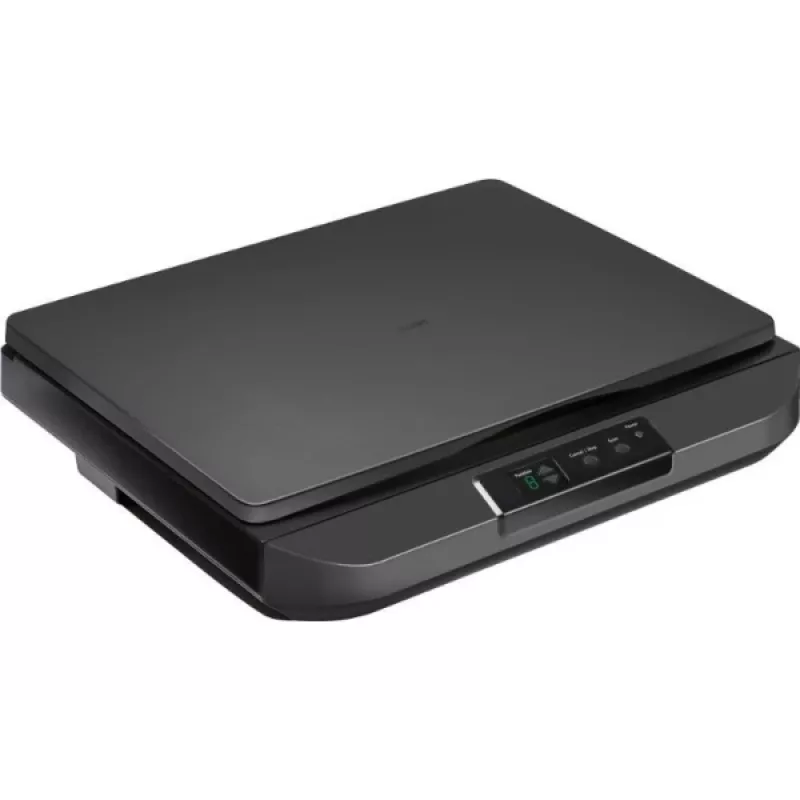
Escáner de sobremesa Avision FB5100 A3 600 dpi USB

Escáner de sobremesa Avision FB5100 A3 600 dpi USB
461,93 €
Avision FB5100 A3 600 dpi USB is a flatbed scanner designed to capture high-resolution digital images from books, large-format documents, photographs and artwork. The device supports A3 document size and offers an optical resolution up to 600 dpi with USB connectivity for direct connection to a comp... Leer más
Stock 4 Código 1163520 Marca AVISION Modelo 000-1129-02G Garantía 2 años

Envíos y devoluciones

Entrega estimada Martes, Octubre 20
Te mantendremos informado a través de nuestro sistema de seguimiento detallado
Opciones de pago
Tarjeta bancariaVisaMastercardPayPalApple PayGoogle PayTransferencia bancaria

Avision FB5100 A3 600 dpi USB is a flatbed scanner designed to capture high-resolution digital images from books, large-format documents, photographs and artwork. The device supports A3 document size and offers an optical resolution up to 600 dpi with USB connectivity for direct connection to a computer. It is intended for environments that require accurate reproduction of larger originals, such as offices, schools and creative studios.

Advantages

The scanner delivers detailed scans up to 600 dpi, providing sufficient clarity for archiving, printing and basic image editing. Its A3 flatbed surface accommodates larger originals without the need for multi-pass stitching. USB connectivity ensures simple setup and stable data transfer to a connected PC. The device's flatbed design enables safe handling of bound materials and delicate originals while minimizing mechanical stress during digitization.

Suitable for

  • Digitizing books, magazines and bound documents
  • Scanning large-format documents, posters and maps
  • Capturing photographs, artworks and prints for archiving
  • Office workflows that require occasional A3 scans

Key specifications

  • Maximum optical resolution: 600 dpi
  • Maximum scan area: A3 size
  • Interface: USB connection for data transfer
  • Device type: Flatbed scanner suitable for delicate and bound originals
  • Image output: Color and monochrome scanning capability

How to use

Place the original face-down on the flatbed glass aligned to the indicated guides. Connect the scanner to a computer using the USB cable and install any required drivers or scanning software supplied by the manufacturer. Use the scanning software to select resolution (up to 600 dpi), color mode and target file format, then preview and perform the final scan. For bound materials, position the spine away from the scanning area and hold pages flat without applying excessive pressure to avoid damage.

Recommendations

For consistent results, clean the scanner glass regularly with a lint-free cloth and manufacturer-recommended cleaner, select 300–600 dpi depending on the intended use (300 dpi for general document archiving, 600 dpi for high-detail images), and store scanned files in organized folders with descriptive filenames and appropriate file formats (PDF for documents, TIFF/JPEG for images).

Aspectos destacados
  • Digitizing books, magazines and bound documents
  • Scanning large-format documents, posters and maps
  • Capturing photographs, artworks and prints for archiving
  • Office workflows that require occasional A3 scans
  • Maximum optical resolution: 600 dpi
  • Maximum scan area: A3 size
  • Interface: USB connection for data transfer
  • Device type: Flatbed scanner suitable for delicate and bound originals
  • Image output: Color and monochrome scanning capability
Especificaciones
Pantalla integrada
No
Historial de precios de los últimos 6 meses
Escáner de sobremesa Avision FB5100 A3 600 dpi USB
Actual
461,93 €
Mínimo
461,41 €
Máximo
713,08 €
Variación 24 h
-1,89 €   0%
Semana
-2,87 €   -1%
Mes
-0,80 €   0%

Productos populares en esta categoría

Hola, soy el asistente de IA de DistriNode. Puedo ayudarte a encontrar productos, comparar opciones, crear presupuestos en PDF o abrir solicitudes de soporte.