
Cuenta Contacto
Tu carrito
Envío con DPD y FedEx
¿Dudas? Pregunte a la IA

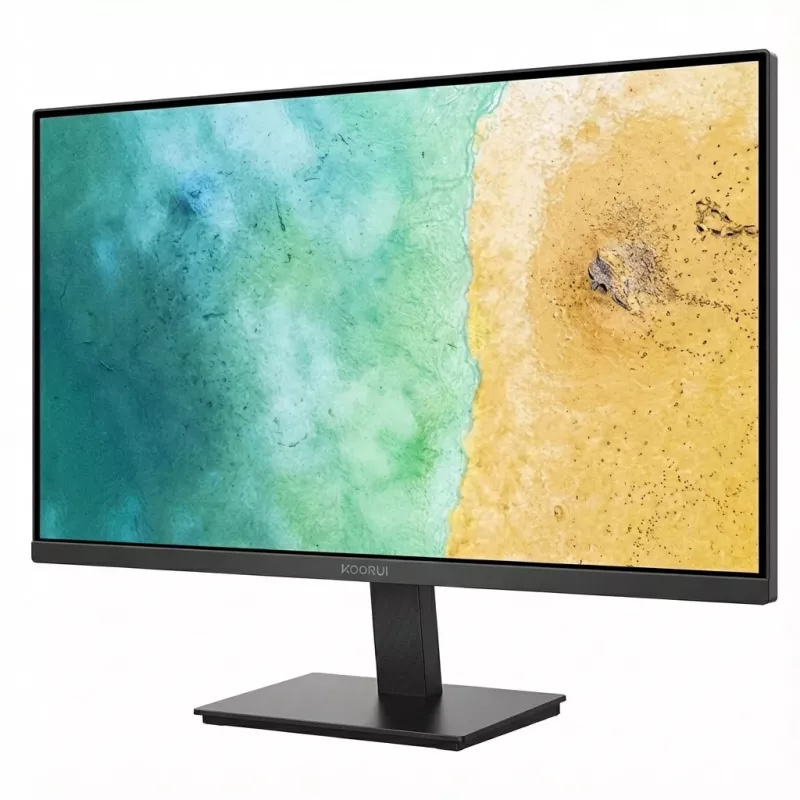
Monitor Koorui E2711F IPS 27" Full HD 1920x1080 100 Hz

Monitor Koorui E2711F IPS 27
Monitor Koorui E2711F IPS 27" Full HD 1920x1080 100 Hz
118,73 €
The Koorui E2711F is a 27-inch IPS monitor with Full HD 1920x1080 resolution and a 100 Hz refresh rate, designed for everyday productivity, media consumption and casual gaming. The IPS panel delivers wide viewing angles and consistent color reproduction across the screen, while the 100 Hz refresh ra... Leer más
Stock 26 Código 1191383 Marca KOORUI Modelo E2711F Garantía 2 años

Envíos y devoluciones

Entrega estimada Jueves, Octubre 15
Te mantendremos informado a través de nuestro sistema de seguimiento detallado
Opciones de pago
Tarjeta bancariaVisaMastercardPayPalApple PayGoogle PayTransferencia bancaria

The Koorui E2711F is a 27-inch IPS monitor with Full HD 1920x1080 resolution and a 100 Hz refresh rate, designed for everyday productivity, media consumption and casual gaming. The IPS panel delivers wide viewing angles and consistent color reproduction across the screen, while the 100 Hz refresh rate reduces motion blur and provides smoother visuals for video playback and gaming compared with standard 60 Hz displays. The slim-bezel design and matte screen surface make the display suitable for multi-monitor setups and bright-room use.

Advantages

The IPS technology ensures color stability and accurate viewing from different angles, supporting collaborative work and comfortable long-term use. A 100 Hz refresh rate improves motion clarity and reduces perceived stutter in fast-moving scenes. Full HD resolution on a 27-inch panel balances detail and readable interface elements for office tasks, web browsing and video streaming. The monitor's ergonomic tilt and connectivity options make it adaptable to various desks and setups.

Suitable for

  • Office work: documents, spreadsheets and web browsing
  • Home multimedia: video streaming and photo viewing
  • Casual gaming and e-sports entry-level play
  • Multi-monitor productivity setups

Key specifications

  • Screen size: 27 inches
  • Panel type: IPS
  • Resolution: Full HD (1920 × 1080)
  • Refresh rate: 100 Hz
  • Aspect ratio: 16:9
  • Surface: anti-glare / matte
  • Viewing angles: wide (typical for IPS)
  • Ergonomics: tilt adjustment

How to use

Connect the Koorui E2711F to a compatible computer or media source using the available video input (use the highest-bandwidth input supported by your source for best performance). Adjust the display position with the tilt mechanism for a comfortable viewing angle. From your computer's display settings, set the output resolution to 1920 × 1080 and the refresh rate to 100 Hz to obtain the intended image quality and motion performance. Calibrate brightness, contrast and color settings as needed for your lighting conditions and content type.

Recommendations

For optimal results in gaming and video, use a graphics card and cable that support 100 Hz at 1920 × 1080. When using the monitor for long periods, reduce blue light exposure in system settings or enable a low-blue-light mode if available, and position the screen to minimize glare and reflections.

Aspectos destacados
  • Office work: documents, spreadsheets and web browsing
  • Home multimedia: video streaming and photo viewing
  • Casual gaming and e-sports entry-level play
  • Multi-monitor productivity setups
  • Screen size: 27 inches
  • Panel type: IPS
  • Resolution: Full HD (1920 × 1080)
  • Refresh rate: 100 Hz
  • Aspect ratio: 16:9
  • Surface: anti-glare / matte
  • Viewing angles: wide (typical for IPS)
  • Ergonomics: tilt adjustment
Especificaciones
Color del producto
Black
Historial de precios de los últimos 6 meses
Monitor Koorui E2711F IPS 27" Full HD 1920x1080 100 Hz
Actual
118,73 €
Mínimo
112,55 €
Máximo
167,51 €
Variación 24 h
-0,09 €   0%
Semana
+4,26 €   +4%
Mes
+1,35 €   +1%

Productos populares en esta categoría

Hola, soy el asistente de IA de DistriNode. Puedo ayudarte a encontrar productos, comparar opciones, crear presupuestos en PDF o abrir solicitudes de soporte.