
Cuenta Contacto
Tu carrito
Envío con DPD y FedEx
¿Dudas? Pregunte a la IA

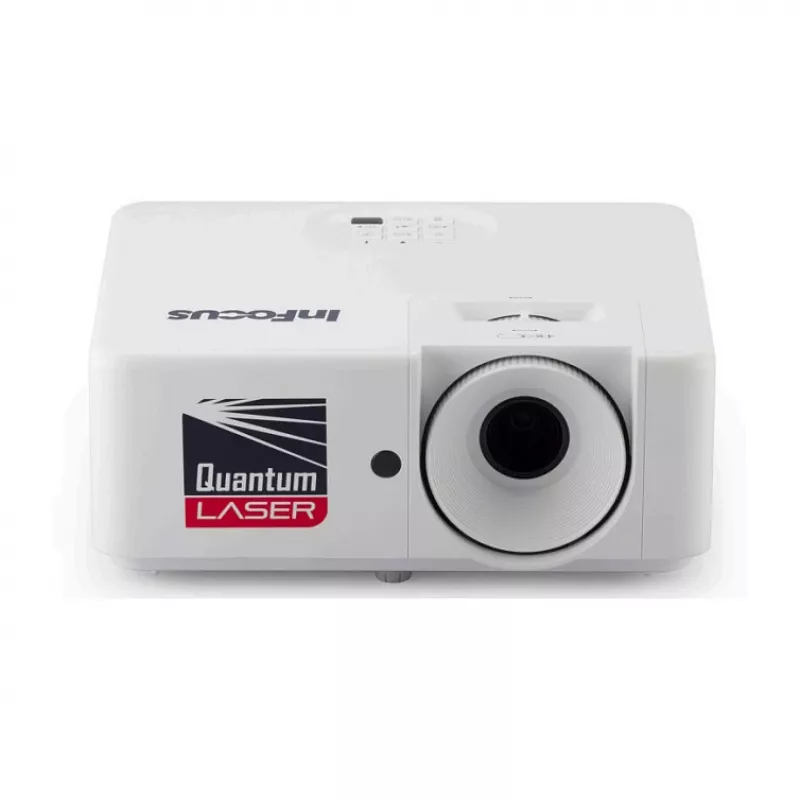
Proyector INFOCUS IN1006SL DLP resolución 1280x800 entrada HDMI VGA

Proyector INFOCUS IN1006SL DLP resolución 1280x800 entrada HDMI VGA
538,45 €
INFOCUS IN1006SL is a DLP projector with 1280x800 (WXGA) resolution designed to deliver clear, wired connectivity for presentations and media playback in medium-sized rooms. With HDMI and VGA inputs, this projector connects to laptops, desktop computers and media players to reproduce content at WXGA... Leer más
Stock 2 Código 1393692 Marca INFOCUS Modelo IN1006SL Garantía 2 años

Envíos y devoluciones

Entrega estimada Jueves, Octubre 22
Te mantendremos informado a través de nuestro sistema de seguimiento detallado
Opciones de pago
Tarjeta bancariaVisaMastercardPayPalApple PayGoogle PayTransferencia bancaria

INFOCUS IN1006SL is a DLP projector with 1280x800 (WXGA) resolution designed to deliver clear, wired connectivity for presentations and media playback in medium-sized rooms. With HDMI and VGA inputs, this projector connects to laptops, desktop computers and media players to reproduce content at WXGA clarity. The compact design supports portable installation and quick setup for business meetings, classroom instruction and home media use where consistent image quality and straightforward cabling are required.

Advantages

The INFOCUS IN1006SL provides native WXGA resolution for improved text and chart readability compared with lower-resolution models. DLP technology ensures stable color reproduction and sharp detail, while HDMI and VGA inputs allow compatibility with a wide range of source devices. The projector’s compact footprint and simple wired connections reduce setup time and make it suitable for routine installation and transport between rooms.

Suitable for

  • Business presentations and conference rooms
  • Classroom teaching and training sessions
  • Small to medium-sized meeting rooms and huddle spaces
  • Home media viewing where wired input is preferred

Key specifications

  • Projection technology: DLP
  • Native resolution: 1280 x 800 (WXGA)
  • Inputs: HDMI and VGA
  • Designed use: presentations, education, home media
  • Form factor: compact, portable installation

How to use

Place the projector on a stable surface or mount it according to room layout, ensuring the lens faces the projection screen or wall. Connect a source device using an HDMI or VGA cable, then select the corresponding input on the projector. Power on the source device and the projector, adjust focus and keystone as required to achieve a sharp, correctly proportioned image. For best results, set the output resolution of the connected laptop or media player to 1280 x 800 (WXGA) when available. Allow the unit to cool before disconnecting cables or moving the projector.

Recommendations

The INFOCUS IN1006SL performs best in controlled ambient lighting; dimming room lights or using a projection screen improves perceived contrast and color. Use a direct HDMI connection for higher-quality digital signals when possible, and periodically check and clean the air filter and lens according to the manufacturer’s maintenance guidance to maintain image clarity and reliable operation.
Aspectos destacados
  • Business presentations and conference rooms
  • Classroom teaching and training sessions
  • Small to medium-sized meeting rooms and huddle spaces
  • Home media viewing where wired input is preferred
  • Projection technology: DLP
  • Native resolution: 1280 x 800 (WXGA)
  • Inputs: HDMI and VGA
  • Designed use: presentations, education, home media
  • Form factor: compact, portable installation
Historial de precios de los últimos 6 meses
Proyector INFOCUS IN1006SL DLP resolución 1280x800 entrada HDMI VGA
Actual
538,45 €
Mínimo
534,07 €
Máximo
638,34 €
Variación 24 h
+1,55 €   +0%
Semana
-3,03 €   -1%
Mes
-7,07 €   -1%

Productos populares en esta categoría

Hola, soy el asistente de IA de DistriNode. Puedo ayudarte a encontrar productos, comparar opciones, crear presupuestos en PDF o abrir solicitudes de soporte.