
Cuenta Contacto
Tu carrito
Envío con DPD y FedEx
¿Dudas? Pregunte a la IA

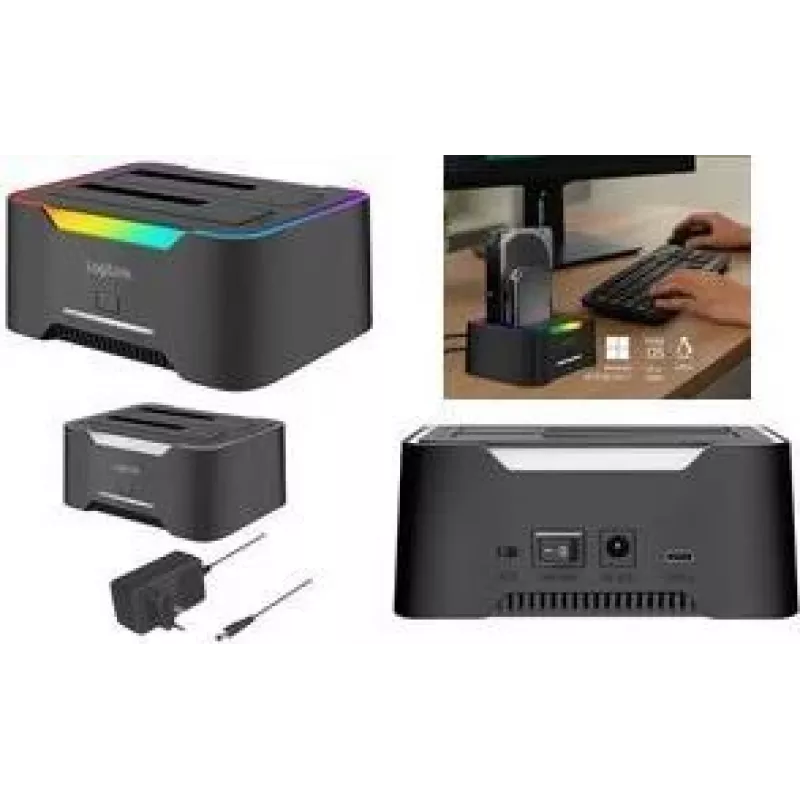
Estación de acoplamiento LOGILINK Quickport QP0036, USB 3.2, doble para HDD/SSD SATA de 2,5/3,5 inch

Estación de acoplamiento LOGILINK Quickport QP0036, USB 3.2, doble para HDD/SSD SATA de 2,5/3,5 inch
41,88 €
LOGILINK Quickport QP0036 is a 2‑port HDD docking station with USB 3.2 connectivity designed for direct use of 2.5" and 3.5" SATA HDDs and SSDs. It enables quick access to internal drives externally, supports hot‑swap operation and offers a simple interface for reading, writing, cloning and backing ... Leer más
Stock 78 Código 2580350 Marca LOGILINK Modelo QP0036 Garantía 2 años

Envíos y devoluciones

Entrega estimada Viernes, Octubre 23
Te mantendremos informado a través de nuestro sistema de seguimiento detallado
Opciones de pago
Tarjeta bancariaVisaMastercardPayPalApple PayGoogle PayTransferencia bancaria

LOGILINK Quickport QP0036 is a 2‑port HDD docking station with USB 3.2 connectivity designed for direct use of 2.5" and 3.5" SATA HDDs and SSDs. It enables quick access to internal drives externally, supports hot‑swap operation and offers a simple interface for reading, writing, cloning and backing up drives without installing them inside a computer. The docking station is suitable for data transfer, recovery tasks and temporary expansion of storage capacity.

Advantages

The device provides USB 3.2 transfer speeds for efficient file operations and supports both 2.5" and 3.5" SATA form factors, accommodating HDDs and SSDs. Hot‑swap functionality allows drives to be inserted and removed while powered, and the two independent bays permit simultaneous use of two drives. The plug‑and‑play design removes the need for internal mounting or additional drivers on most operating systems.

Suitable for

Key specifications

How to use

Connect the docking station to a host computer using the supplied USB 3.2 cable and power it on. Insert a 2.5" or 3.5" SATA drive into one of the bays until it seats securely. The operating system should detect the drive automatically and present it as an external storage device. For cloning, follow the manufacturer’s cloning procedure if the device supports standalone cloning, or use cloning or backup software on the connected computer to duplicate data between drives. Remove drives after safely ejecting them from the operating system or powering the docking station down if required.

Recommendations

Use a USB 3.2 connection for optimal transfer speeds and connect the docking station to a USB port that provides sufficient power or use the supplied external power adapter if applicable. Always perform safe eject procedures in the operating system before removing drives to avoid data corruption. For long‑term storage or frequent data transfers, consider using SSDs for higher durability and faster performance.

Aspectos destacados
  • Direct access to data on 2.5" and 3.5" SATA HDDs and SSDs
  • Cloning drives or duplicating content between two drives
  • Backup and quick transfer of large files
  • Data recovery from removed or unused drives
  • Temporary expansion of storage for laptops and desktops
  • Interface: USB 3.2 for host connection
  • Drive bays: 2 independent SATA bays compatible with 2.5" and 3.5" HDD/SSD
  • Supported drive types: SATA HDD and SATA SSD
  • Operation: Hot‑swap support for drive insertion and removal while powered
  • Functionality: Read/write access and drive cloning capability
Historial de precios de los últimos 6 meses
Estación de acoplamiento LOGILINK Quickport QP0036, USB 3.2, doble para HDD/SSD SATA de 2,5/3,5 inch
Actual
41,88 €
Mínimo
40,61 €
Máximo
59,00 €
Variación 24 h
+1,18 €   +3%
Semana
+0,99 €   +2%
Mes
-7,70 €   -16%

Productos populares en esta categoría

Vendedor: UAB KUR LT · Laisvės pr. 125A, LT-06118 Vilna, Lituania · Código de empresa 303192950 · NIF-IVA UE LT100008198612 · Envío desde la UE (Lituania)
Hola, soy el asistente de IA de DistriNode. Puedo ayudarte a encontrar productos, comparar opciones, crear presupuestos en PDF o abrir solicitudes de soporte.