
Cuenta Contacto
Tu carrito
Envío con DPD y FedEx
¿Dudas? Pregunte a la IA

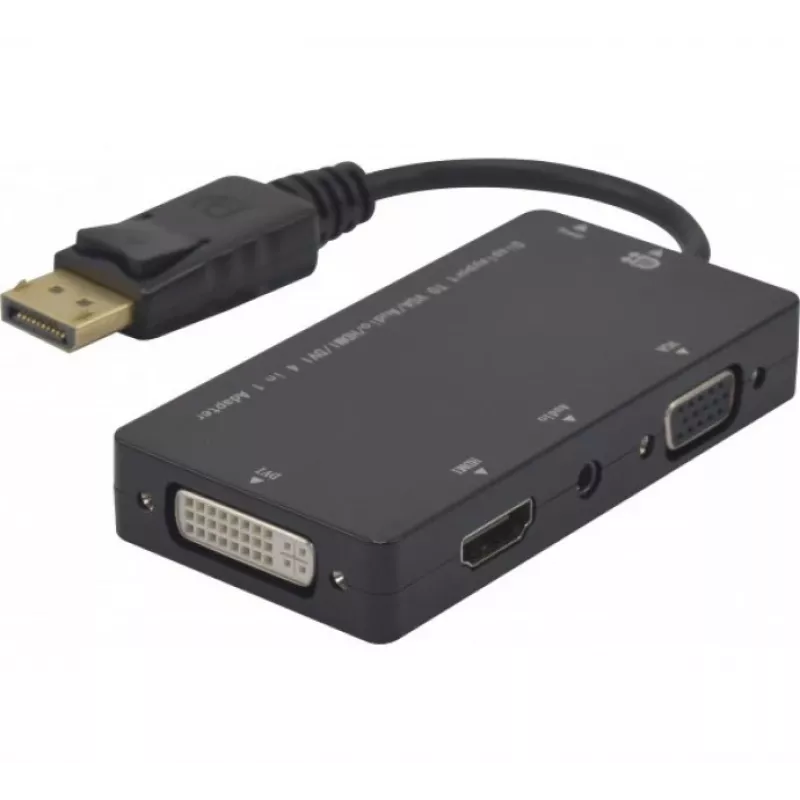
Hypertec 127377-HY Adaptador de cable de vídeo DisplayPort DVI-D + VGA (D-Sub) + HDMI negro

Hypertec 127377-HY Adaptador de cable de vídeo DisplayPort DVI-D + VGA (D-Sub) + HDMI negro
38,12 €
The Hypertec ProConnectLite DisplayPort to HDMI, DVI-D, VGA adapter (model 127377-HY) provides a single DisplayPort input with selectable outputs for HDMI, DVI-D and VGA (D-Sub). Designed for connecting a laptop or desktop with DisplayPort to a range of external displays, projectors or older monitor... Leer más
Stock 70 Código 2396386 Marca Hypertec Modelo 127377-HY Garantía 2 años

Envíos y devoluciones

Entrega estimada Martes, Octubre 27
Te mantendremos informado a través de nuestro sistema de seguimiento detallado
Opciones de pago
Tarjeta bancariaVisaMastercardPayPalApple PayGoogle PayTransferencia bancaria

The Hypertec ProConnectLite DisplayPort to HDMI, DVI-D, VGA adapter (model 127377-HY) provides a single DisplayPort input with selectable outputs for HDMI, DVI-D and VGA (D-Sub). Designed for connecting a laptop or desktop with DisplayPort to a range of external displays, projectors or older monitors, the compact black plastic adapter offers a convenient solution for presentations and multi-monitor setups while maintaining a reliable physical connection via a male DisplayPort plug.

Advantages

This adapter supports three common video output standards—HDMI, DVI-D and VGA—allowing compatibility with modern TVs and projectors as well as legacy VGA/DVI displays. The male DisplayPort connector ensures a secure fit to the source device, and the durable plastic housing contributes to everyday portability and resistance to wear. Its compact size simplifies transport and storage.

Suitable for

Key specifications

How to use

Plug the male DisplayPort connector into the DisplayPort output on your computer or laptop. Choose the required output cable (HDMI, DVI-D or VGA) and connect it to the corresponding display input. Power on the display and, if necessary, select the correct input source on the monitor or projector. Configure the display settings in your operating system to set resolution and display mode (mirror, extend, single display) as required.

Recommendations

For best results, use HDMI or DVI-D for digital connections to preserve signal quality; use VGA only when digital inputs are not available. Avoid forcing connectors and ensure the DisplayPort port on the source device supports video output. Keep the adapter in a protective sleeve when transporting to reduce wear.
Aspectos destacados
  • Connecting a DisplayPort-equipped laptop or desktop to an HDMI TV or monitor
  • Connecting to DVI-D compatible displays or projectors
  • Connecting to legacy VGA (D-Sub) monitors or projectors
  • Presentations, classrooms, meeting rooms and multi-monitor workstations
  • Connector 1: DisplayPort (male)
  • Connector 2: DVI-D + VGA (D-Sub) + HDMI
  • Product colour: Black
  • Brand: Exertis Connect / Hypertec ProConnectLite
  • Manufacturer part number (MPN): EXC127377 / 127377-HY
  • EAN: 3548381273776
Especificaciones
3D
No
Ancho de cinta
10800 MB/s
Cantidad por paquete
1 pc(s)
Color del producto
Black
Conector 1
DisplayPort
Conector 2
DVI-D + VGA (D-Sub) + HDMI
Conector de audio
Yes
Formato del conector 1
Straight
Formato del conector 2
Straight
Género del conector 1
Male
Género del conector 2
Female
Material
Plastic
Resolución máxima
1920 x 1080 pixels
Tipo de conector de audio
3.5 mm (1/8")
Tipo de convertidor
Passive video converter
Versión de DisplayPort
1.1

Folleto

Abrir documento
Historial de precios de los últimos 6 meses
Hypertec 127377-HY Adaptador de cable de vídeo DisplayPort DVI-D + VGA (D-Sub) + HDMI negro
Actual
38,12 €
Mínimo
37,68 €
Máximo
38,12 €
Variación 24 h
+0,29 €   +1%
Semana
+0,21 €   +1%
Mes
—   

Productos populares en esta categoría

Hola, soy el asistente de IA de DistriNode. Puedo ayudarte a encontrar productos, comparar opciones, crear presupuestos en PDF o abrir solicitudes de soporte.