
Cuenta Contacto
Tu carrito
Envío con DPD y FedEx
¿Dudas? Pregunte a la IA

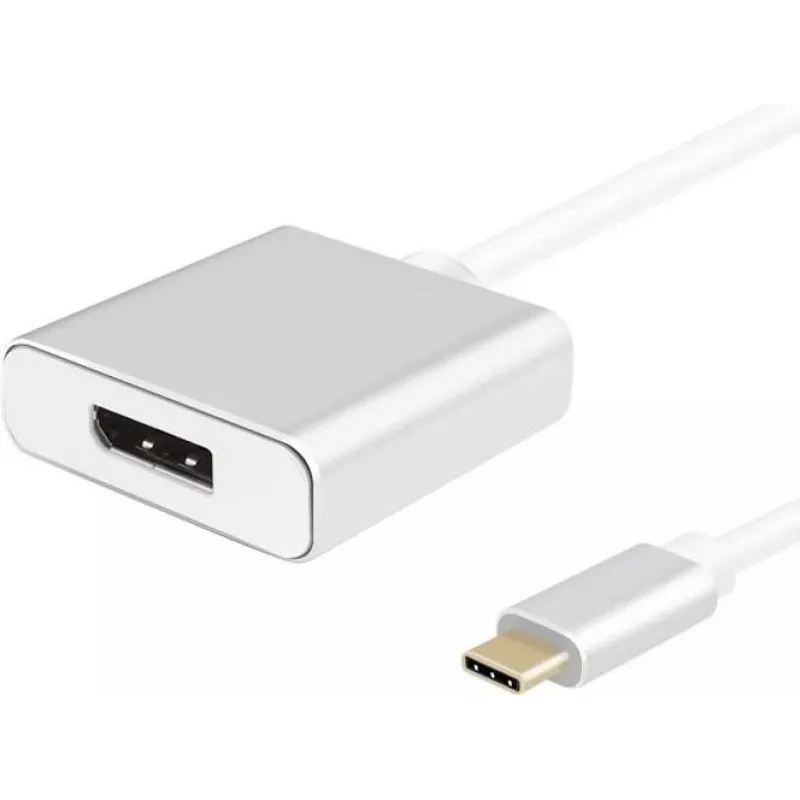
Cable adaptador helos USB 3.1 Type-C a DisplayPort 1.2, modelo 288372

Cable adaptador helos USB 3.1 Type-C a DisplayPort 1.2, modelo 288372
9,74 €
Helos PREMIUM USB-C to DisplayPort adapter cable (model 288372) is a 10 cm adapter that converts a USB 3.1 / USB-C video output to a DisplayPort 1.2 input. The cable is intended for transmitting video signals from laptops or devices with a USB-C (24‑pin) port to monitors or displays with a DisplayPo... Leer más
Stock 38 Código 1426318 Marca HELOS Modelo 288372 Garantía 2 años

Envíos y devoluciones

Entrega estimada Viernes, Octubre 23
Te mantendremos informado a través de nuestro sistema de seguimiento detallado
Opciones de pago
Tarjeta bancariaVisaMastercardPayPalApple PayGoogle PayTransferencia bancaria

Helos PREMIUM USB-C to DisplayPort adapter cable (model 288372) is a 10 cm adapter that converts a USB 3.1 / USB-C video output to a DisplayPort 1.2 input. The cable is intended for transmitting video signals from laptops or devices with a USB-C (24‑pin) port to monitors or displays with a DisplayPort (20‑pin) connector, supporting up to 4K resolution. The connector housings are made of aluminum and the jacket material is thermoplastic elastomer (TPE).

Advantages

This short 10 cm adapter provides a compact and robust connection for connecting USB-C devices to DisplayPort monitors. It supports DisplayPort 1.2 video features and 4K resolution, complies with REACH and RoHS2, and uses a durable aluminum connector housing with a TPE cable jacket for everyday use.

Suitable for

  • Connecting laptops with USB-C output to external monitors with DisplayPort input
  • Presentations and meeting rooms where a reliable short adapter is needed
  • Multimonitor setups where a direct USB-C to DisplayPort link is preferred

Key specifications

  • Model: 288372
  • Length: 10 cm
  • Interfaces: 24‑pin USB-C (male) to 20‑pin DisplayPort (female)
  • Standards: USB 3.1 / DisplayPort 1.2
  • Video support: up to 4K (per DisplayPort 1.2 capabilities)
  • Cable jacket: thermoplastic elastomer (TPE)
  • Connector housing: aluminum
  • Color: silver
  • Certifications/marking: REACH, RoHS2
  • EAN: 4005938883721

How to use

Insert the USB-C (male) connector into the USB-C video output of your laptop or device. Plug the DisplayPort (female) end to a DisplayPort cable that connects to your monitor. Ensure the host device outputs video over USB-C (DisplayPort Alt Mode) and select the correct input on the monitor. No separate drivers are required for standard video pass-through; use the display settings of your operating system to configure resolution and multi-monitor layout.

Recommendations

Use this adapter for short, direct connections between a USB-C source and a DisplayPort-equipped monitor. Avoid excessive bending at the connector ends and keep the cable length appropriate for the application to ensure stable video transmission at 4K resolutions.
Aspectos destacados
  • Connecting laptops with USB-C output to external monitors with DisplayPort input
  • Presentations and meeting rooms where a reliable short adapter is needed
  • Multimonitor setups where a direct USB-C to DisplayPort link is preferred
  • Model: 288372
  • Length: 10 cm
  • Interfaces: 24‑pin USB-C (male) to 20‑pin DisplayPort (female)
  • Standards: USB 3.1 / DisplayPort 1.2
  • Video support: up to 4K (per DisplayPort 1.2 capabilities)
  • Cable jacket: thermoplastic elastomer (TPE)
  • Connector housing: aluminum
  • Color: silver
  • Certifications/marking: REACH, RoHS2
  • EAN: 4005938883721
Historial de precios de los últimos 6 meses
Cable adaptador helos USB 3.1 Type-C a DisplayPort 1.2, modelo 288372
Actual
9,74 €
Mínimo
8,48 €
Máximo
16,92 €
Variación 24 h
+0,52 €   +6%
Semana
+0,54 €   +6%
Mes
-7,11 €   -42%

Productos populares en esta categoría

Hola, soy el asistente de IA de DistriNode. Puedo ayudarte a encontrar productos, comparar opciones, crear presupuestos en PDF o abrir solicitudes de soporte.